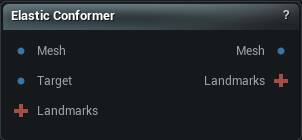
The Elastic Conformer node
When to use it
Wraps a source mesh onto a target surface by stretching it elastically, so it takes the target's shape while keeping its own topology: same vertex count, same order, same UVs, same skin weights.
That is what makes it a garment tool rather than a remesher. A jacket conformed onto a new body is still the same jacket underneath - everything already rigged and textured against those vertices survives the wrap. Non-Rigid Fit does the same job with a stiffness schedule and a much larger set of controls; this one is the faster, simpler route when the two shapes already sit close together.
Landmarks are optional but they are what keeps a collar on the collar. Without them the wrap only knows about nearest surface, and a sleeve near a ribcage will happily grab the ribcage.
How to use it
- 1
Connect the source mesh, the target, and landmarks if you have them
- 2
Set the iterations, stiffness and search range
- 3
Click Apply
Pins
| Pin | Type | Description |
|---|---|---|
Mesh |
Mesh | The mesh that gets pulled onto the target. Its vertex count and layout survive. |
Target |
Mesh | The surface being wrapped onto. It does not move. |
Landmarks |
Landmarks | Optional. Point and curve pairs that pin parts of the source to known places on the target. |
| Pin | Type | Description |
|---|---|---|
Mesh |
Mesh | The wrapped mesh, same vertex count and layout as it went in. |
Landmarks |
Landmarks | The landmarks you wired in, moved onto the wrapped mesh. |
Settings
| Setting | Type | Description |
|---|---|---|
Iterations |
Whole number | How many passes to make. More gets closer to the target and takes longer. |
| Setting | Type | Description |
|---|---|---|
Stiffness |
Number | How much the mesh holds together as it travels. High and it moves as one piece. Low and each vertex goes its own way, which is where the crumpling and the jagged spikes come from. |
Smoothing Iterations |
Whole number | How many smoothing passes run after each main pass. |
Adaptive Smoothing Iterations |
True/False | Taper those smoothing passes off as the run goes on, so it tidies hard early and leaves the detail alone at the end. |
Smoothing Neighbors |
Whole number | How many nearby vertices each vertex is smoothed against. |
Neighbor Radius |
Number | How far the smoothing reaches, measured against typical vertex spacing. Higher lets distant neighbours have a say and rounds the result off. Lower keeps it local. |
| Setting | Type | Description |
|---|---|---|
Vertex Range |
Number | How far a vertex will look for somewhere to land on the target. Too small and patches of the mesh never find the surface and just sit where they started. Too large and a sleeve grabs the ribcage underneath it. |
Projection: Max Displacement Scale |
Number | How far a single vertex is allowed to travel in one pass, counted in average edge lengths. Lower reins in the spikes; higher lets the mesh cross a bigger gap in fewer passes. |
Projection Type |
Choice | How a vertex travels to its match. Point to Point heads straight for the nearest point on the target. Point to Plane slides along the target surface instead, which settles far more calmly once you are close. |
| Setting | Type | Description |
|---|---|---|
Landmark Weight |
Number | How hard the landmarks pull. Higher pins them tighter and lets the surface around them distort more to obey. |
Adaptive Landmark Weight |
True/False | Fade the landmark pull out as the run goes on, so they place the mesh early and then let the surface settle onto the target on its own. |
Influence Decay |
Number | How far a landmark's grip reaches into the vertices around it. Higher freezes a wider patch of surface around each one. |
Propagation Duration |
Number | What share of the run that grip keeps spreading for. Higher reaches further and costs more. |
Mobility Dampening |
Number | How stubbornly the area near a landmark resists being smoothed. Higher keeps it rigid. |
Influence Falloff |
Number | How abruptly that grip stops. Higher gives a tighter frozen patch with a harder edge to it. |
| Setting | Type | Description |
|---|---|---|
Use GPU Acceleration |
True/False | Do the hunting for matches on the GPU. Much faster once the mesh passes a few thousand vertices, and it falls back to the CPU on its own when the GPU cannot take it. |
| Setting | Type | Description |
|---|---|---|
Visualization Mode |
Choice | What gets painted on the mesh in the diagnostic window that opens beside the app while the wrap runs. Displacement colours by how far each vertex has come, Iteration Delta by how far it moved this pass, Correspondence Weight by how much the fit trusts its match. It is a tuning aid for watching the solver work, not a preview. Disabled opens no window and is the quickest. |
Preview Update Interval |
Whole number | How many passes go by between redraws of that window. Higher redraws less often and steals less time from the wrap. 1 redraws every pass. |
Preview: Max Displacement Scale |
Number | Has no effect at present. The colours in that window are scaled from the Max Displacement Scale setting under Projection instead. |
Learn more
| 3D wrap MetaHuman conform meshes | Read the walkthrough on meshmorpher.com | https://meshmorpher.com/blog/how-to-3d-wrap-metahuman-conform-meshes-in-unreal-engine-with-mesh-morpher-graph |
| Wrapper with MH and DAZ characters | Read the walkthrough on meshmorpher.com | https://meshmorpher.com/blog/mesh-morpher-wrapper-with-mh-and-daz-characters |
Available in Mesh Morpher Graph and Mesh Morpher Studio.