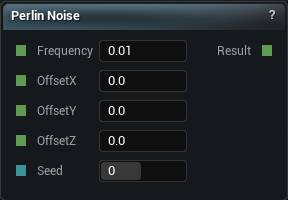
The Perlin Noise node
When to use it
Classic Perlin. Smoothly varying pseudo-random values, good for soft bumps and gentle organic detail. Output sits roughly between -1 and 1, so remap before treating it as a mask.
One octave only. For the layered detail that actually reads as terrain, Perlin FBM.
Perlin has mild axis-aligned artefacts, faint grid lines you notice once you know they are there. Simplex is the better default for that reason.
Pins
| Pin | Type | Description |
|---|---|---|
Frequency |
Number | How tight the pattern is. Higher numbers give you finer, busier detail. |
OffsetX |
Number | Slide the pattern along X. |
OffsetY |
Number | Slide the pattern along Y. |
OffsetZ |
Number | Slide the pattern along Z. |
Seed |
Whole Number | Change this for a different pattern at the same settings. The same seed always gives you the same noise. |
| Pin | Type | Description |
|---|---|---|
Result |
Number | The noise here. Roughly -1 to 1. |
Available in Mesh Morpher Graph and Mesh Morpher Studio.