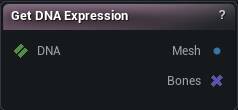
The Get DNA Expression node
When to use it
One named expression, evaluated out of a DNA with all its blendshapes combined and the skeleton deformation applied, handed back to you as a mesh. Turned all the way on, so you can see what a control actually does before you change it.
Seeing, sculpting on or comparing an expression is what it is for. For one shape in isolation rather than the combined result, use Get DNA Blendshape.
LOD Index picks which resolution of the mesh you get, and the meshes at different LODs have different vertex counts. A shape captured at one LOD cannot be written back at another.
Set DNA Expression closes the loop.
How to use it
- 1
Wire a DNA in
- 2
Pick an expression and an LOD
- 3
Mesh is the posed mesh
Bones tells you which joints that expression drives.
Pins
| Pin | Type | Description |
|---|---|---|
DNA |
DNA | The DNA to read the expression out of. |
| Pin | Type | Description |
|---|---|---|
Mesh |
Mesh | The mesh posed at that expression, skinned to the bones the expression moves. |
Bones |
Bone Selection | The joints this expression actually moves. Handy for narrowing a bone selection to just the ones in play. |
Settings
| Setting | Type | Description |
|---|---|---|
Expression Name |
Text | Which expression to pose. The list is read from the DNA on the input pin, so connect that first or the dropdown is empty. |
LOD Index |
Whole number | Which LOD to build the posed mesh from. 0 is the densest. |
Learn more
| Modify MetaHuman RBF poses | Read the walkthrough on meshmorpher.com | https://meshmorpher.com/blog/modify-metahuman-rbf-poses |
| Modify DNA bone expressions | Read the walkthrough on meshmorpher.com | https://meshmorpher.com/blog/modify-meta-human-dna-bone-expressions-with-mesh-morpher |
| Custom DNA topology | Read the walkthrough on meshmorpher.com | https://meshmorpher.com/blog/custom-dna-topology-with-mesh-morpher-graph |
Available in Mesh Morpher Graph and Mesh Morpher Studio.