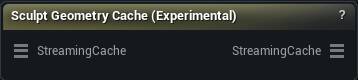
The Sculpt Geometry Cache (Experimental) node
When to use it
Sculpts a fix onto one frame of an Alembic or USD cache and bakes it back into the cache, spread across a frame range you choose.
A cache has no rig to correct through: it is baked geometry, and whatever went wrong in it went wrong for good. This is the way to fix it anyway - scrub to the bad frame, push the surface back where it belongs, and let the correction ride along on the frames either side.
Frames stream off disk as you scrub, so a long cache never has to fit in memory. Still experimental.
How to use it
- 1
Wire a cache into Streaming Cache and select the node
- 2
Scrub to the bad frame, pick a frame range, sculpt, press Accept
- 3
Set the fades so the correction ramps in and out instead of popping
Pins
| Pin | Type | Description |
|---|---|---|
StreamingCache |
Streaming Geometry Cache | The Alembic or USD cache to sculpt on. Frames load off disk as you scrub, so the whole animation never has to fit in memory. |
| Pin | Type | Description |
|---|---|---|
StreamingCache |
Streaming Geometry Cache | The same cache with your sculpt baked in. Get Frame and the export nodes pick it up on their own. |
Settings
| Setting | Type | Description |
|---|---|---|
Fade In Frames |
Whole number | Frames at the start of the selected range over which the sculpt ramps up from nothing. 0 makes it pop on fully at the first frame. |
Fade Out Frames |
Whole number | Frames at the end of the selected range over which the sculpt ramps back down to nothing. 0 makes it cut off at the last frame. |
Rotate Deltas |
True/False | Turn each sculpted offset with the surface as it moves through the range. Off, a bump you sculpted on a straight arm keeps pointing the same way in space and slides off the arm the moment it bends. |
Smoothing Iterations |
Whole number | How much the surface is smoothed before it works out which way each vertex has turned. More passes give a steadier answer where the mesh folds hard, which is exactly where a sculpt otherwise starts to swim. 10 to 40 is the usual range, and 0 turns it off. |
Num Rings |
Whole number | How far out from each vertex that turn is measured, in rings of neighbours. 1 uses only the vertices touching it, 2 also uses their neighbours, and so on. A wider ring gives a steadier answer on a dense mesh. |
Smoothing Strength |
Number | How far each smoothing pass moves a vertex toward its neighbours. Higher settles faster and keeps less fine detail. It stops at 0.5, and that ceiling is not arbitrary: past roughly 0.72 the smoothing starts amplifying exactly the wobble it is meant to remove, and the iteration count turns that into a mesh full of invalid positions. A saved file carrying a bigger number is pulled back into range when it loads. |
Learn more
| Mesh Morpher Studio | Read the walkthrough on meshmorpher.com | https://meshmorpher.com/blog/mesh-morpher-studio |
Available in Mesh Morpher Graph and Mesh Morpher Studio.