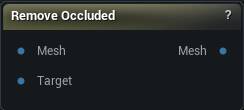
The Remove Occluded node
When to use it
Deletes interior triangles that cannot be seen from outside, using winding number or raycast sampling. Hidden geometry inside a merged or scanned asset - the inner wall of a double-sided surface, a body under clothing - costs triangles and confuses bakes.
Winding number is the more reliable test and wants a reasonably closed mesh. Raycast works on open ones, but a sample count that is too low fools it, either leaving interior shells behind or punching holes through thin visible geometry.
Weld first. An unwelded surface has no inside for the winding number to compute.
How to use it
- 1
Wire the mesh into Mesh
Leave
Targetempty and the mesh hides itself, which is what you want on a kitbash full of overlapping shells. - 2
To strip a body under clothing
Wire the body into
Meshand the clothing intoTarget. - 3
Press Remove Occluded
This deletes triangles for good. If the cut nibbles into surface you can still see, raise
Shrink Removala ring or two before reaching for anything else.
Pins
| Pin | Type | Description |
|---|---|---|
Mesh |
Mesh | The mesh to cut hidden triangles out of. |
Target |
Mesh | Optional second mesh doing the hiding. Wire the jacket in here to strip the torso underneath it. Empty means the mesh hides itself. |
| Pin | Type | Description |
|---|---|---|
Mesh |
Mesh | The mesh with the hidden triangles gone. |
Settings
| Setting | Type | Description |
|---|---|---|
Occlusion Test Method |
Choice | How a triangle is judged hidden. |
Triangle Sampling |
Choice | Where on each triangle the test gets taken. |
Winding Iso Value |
Number | The cutoff that separates inside from outside for the winding test. 0.5 is the standard value; raise it to be stricter about what counts as inside and keep more, lower it to cut more. |
Add Random Rays |
Whole number | Extra rays in random directions on top of the six axis rays. Raise it when the raycast test is leaving slivers of hidden surface behind. |
Add Triangle Samples |
Whole number | Extra sample points scattered over each triangle. Raise it when big triangles are being kept because a corner happens to peek out. |
Shrink Removal |
Whole number | Pulls the removal set back by this many rings of triangles before deleting, so the cut stops short of the visible surface instead of nibbling into it. |
Min Area Island |
Number | After the cut, delete any leftover island with less surface area than this. 0 keeps them all. |
Min Tri Count Island |
Whole number | After the cut, delete any leftover island with fewer triangles than this. 0 keeps them all. |
Available in Mesh Morpher Graph and Mesh Morpher Studio.