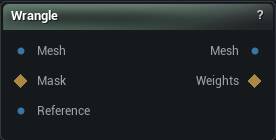
The Wrangle node
When to use it
Write a line of maths and it runs on every vertex, or every triangle. Move points with P, tilt normals with N, push colour into Cd, read and write your own named attributes, and send a weight map out through wmap("Name") = .... There are loops, neighbour lookups, noise, vector maths and a Python stage.
Taper a limb by height. Build a mask from a UV band. Jitter a colour by a hashed vertex id. Drive a named attribute from arithmetic on the others. Anything the rest of the library has no node for.
// a falloff from a second mesh, out as a weight map
wmap("Weights") = 1 - saturate(neardist("Reference", P) / 25);
It runs on the CPU. A short expression over a two-million-vertex mesh costs tens of milliseconds, not the fraction of a millisecond a compute shader would. It is a graph operation, not an interactive brush - and that is structural: a cooked build carries no shader source tree and no shader compiler to give it one.
The first five minutes
- 1
Place the node
A fresh Wrangle has no pins and no required inputs. Pressing Run at this point is a successful no-op.
- 2
Press Add Classic Mesh Setup
One click gives you the usual layout: a Mesh input, a Mask weight map, a Reference mesh and a Weights output. The button lives on the node's right-click menu and in the pin editor, and it only shows while the node has declared nothing at all - it appends, it never replaces.
- 3
Write the expression
One statement per line, or separate them with
;. Anything after//or#is a comment. - 4
Press Run
Editing never runs the node. Changing the expression, a parameter or the run mode only marks the output out of date, with an amber badge on the node. Run evaluates it and clears the badge.
A freshly placed node that has never been run publishes nothing downstream. There is no input-mesh passthrough waiting to happen: the input only passes through when an already-declared run fails partway.
What one run means
Run Over decides what a single run of your code corresponds to. It is not a performance setting - it changes which channels exist and what your code is allowed to touch.
| Run Over | One run is | What it is for |
|---|---|---|
| Vertex | one vertex | Moving points, per-vertex masks, anything that reads P and N. |
| Triangle | one triangle | Per-face work: area, face normals, material and group ids. |
| Corner | one face-vertex | Exact per-corner N, uv and Cd, splitting a shared overlay element where corners disagree. Both the owning vertex and the owning triangle are readable at once. |
| Texel | one texel of this node's own output image | Writing an image rather than a mesh. |
| Once (Detail) | the whole mesh, exactly once, single threaded | Landmark edits, setoutput() value outputs, and the only mode that may add or remove geometry. |
Pins are yours to declare
There are no fixed pins. Every input and output on this node is one you declared, in the Parameters and User Outputs lists, and each one becomes a pin named after it.
- Mesh is not a reserved word. Declare a Mesh parameter and it becomes the subject automatically when it is the only one -
P,N,Cd,uvand the run-over all read it. Declare a second and flag one Primary. - Reference is not special either. Every donor mesh is read through the pin-name form,
neardist("Pin", p),nearpoint("Pin", p),sdist("Pin", p). The classic layout just happens to call its donor pin Reference, by convention. - A Weight Map parameter named Mask is what
maskreads. - A DNA parameter becomes a DNA input pin, read from the expression through the
dna*("Pin", ...)functions - joints, meshes, blend shapes, controls and skin weights. - A parameter and a user output may share a name. They live in separate namespaces, so a read resolves the input and
setoutput()writes the output.
Press Create pins from code to pick up names you have already typed into the expression.
Settings
| Setting | Type | Description |
|---|---|---|
Expression |
Text | The code. One statement per line, or separated with ;. |
Run Over |
Choice | What one run corresponds to: Vertex, Triangle, Corner, Texel or Once (Detail). |
Run Per |
Choice | Vertex or triangle, for the two per-element modes. Ignored in Corner, Texel and Detail. |
Output Width |
Whole number | Output image width in texels, Texel mode only. 0 takes it from the first wired Texture parameter. |
Output Height |
Whole number | Output image height in texels, Texel mode only. Same auto rule as the width. |
Create Missing Attributes |
True/False | Let the code invent an attribute by assigning to a name the mesh does not have. Off is the safer default: a misspelled @name is then an error rather than a new, empty attribute nothing reads. |
Restrict |
Choice | Narrows the run to the elements that pass a test, instead of hand-writing if (mask > 0) at the top of the expression. |
Restrict Value |
Whole number | The material ID or polygroup id to restrict against. Ignored for None and Mask. |
Iterations |
Whole number | How many times the whole evaluate-and-apply cycle repeats, each pass reading the last one's result. This is what turns a one-step neighbour average into a real smooth. |
Show displacement |
True/False | Preview overlay of how far each vertex moved on the last run that wrote P. |
Python Script |
Text | The script, authored through the #@python blocks in the same code editor. |
Interactive Script |
True/False | Tick it when the script opens a window of its own and waits on it. |
Run Python Isolated |
True/False | Run this node's Python stage out of process, even on a machine whose interpreter could host it in process. |
User Params |
List | The input parameters you declare. One input pin per entry. |
User Outputs |
List | The value outputs you declare. |
Sharing a configured Wrangle
Pin layout, the expression, any Python and every parameter's current value travel together as one unit. Right-click the node for Export Node Preset (a .mmnode file with a title, author and description you fill in), Save to My Presets (installs it into Installed Nodes on this machine, with an Uninstall action that never touches a graph you already placed it into), or Copy as Shareable Text for a clipboard envelope anyone can paste into their own graph.
Importing a preset never runs the Python it carries. A script only ever executes from an explicit Run press - the same rule that governs a pasted node or a freshly opened graph.
Reference
The full language, one page per area. Every entry gives the syntax, what it does, and a line you can paste.
| Language and control flow | Statements, operators, types, loops and your own functions. | /docs/studio-and-graph/geometry/wrangle/language-and-control-flow |
| Channels and attributes | P, N, uv, Cd and the rest, per domain, plus the @attributes you name yourself. | /docs/studio-and-graph/geometry/wrangle/channels-and-attributes |
| Parameters | The inputs you declare on the node: floats, vectors, weight maps, ramps, transforms and deltas. | /docs/studio-and-graph/geometry/wrangle/parameters |
| Scalar and vector functions | Maths on numbers and on vectors, plus the integer and debug helpers. | /docs/studio-and-graph/geometry/wrangle/scalar-and-vector-functions |
| Noise | Deterministic simplex noise: the same input gives the same value on every run. | /docs/studio-and-graph/geometry/wrangle/noise |
| Neighbours, transforms and distance | Walking the one-ring, moving points and frames around, and geodesic distance across the surface. | /docs/studio-and-graph/geometry/wrangle/neighbours-transforms-and-distance |
| Donor mesh pins | Reading a second mesh by pin name: positions, normals, attributes, nearest points and ray hits. | /docs/studio-and-graph/geometry/wrangle/donor-mesh-pins |
| Textures and landmarks | Sampling a Texture pin, and reading or writing a Landmarks pin. | /docs/studio-and-graph/geometry/wrangle/textures-and-landmarks |
| MetaHuman DNA | Reading a DNA by pin name: joints, meshes, blend shapes, controls and skin weights. | /docs/studio-and-graph/geometry/wrangle/metahuman-dna |
| Run modes: Texel and Corner | What one run means in the two per-element modes that are not Vertex or Triangle. | /docs/studio-and-graph/geometry/wrangle/run-modes-texel-and-corner |
| Run mode: Detail | The mode that runs once for the whole mesh, and the only one that may add or remove geometry. | /docs/studio-and-graph/geometry/wrangle/run-mode-detail |
| Arrays | Growable lists of floats or vectors, local to one run of the expression. | /docs/studio-and-graph/geometry/wrangle/arrays |
| Skin weights and viewport | Reading and writing the mesh's real skin weights, and drawing debug geometry. | /docs/studio-and-graph/geometry/wrangle/skin-weights-and-viewport |
| Python stage | The #@python blocks: when they run, what they can reach, and how they feed the expression. | /docs/studio-and-graph/geometry/wrangle/python-stage |
| Python API | Everything on the mm object, plus the mm.ui buttons and labels a script can declare. | /docs/studio-and-graph/geometry/wrangle/python-api |
| Examples | Every recipe the code editor's own Examples menu inserts, expression and Python. | /docs/studio-and-graph/geometry/wrangle/examples |
Available in Mesh Morpher Graph and Mesh Morpher Studio.