Editor-only node. Runs only in Mesh Morpher Graph inside the Unreal Editor, because it reads or writes Unreal Engine assets. Not available in the standalone Mesh Morpher Studio app.
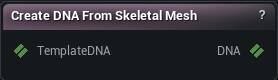
The Create DNA From Skeletal Mesh node
When to use it
Create DNA's asset-picker-sourced sibling: the same build - skeleton, skin weights, geometry, plus a structurally complete but functionally identity behavior layer, and the same optional Scaffold Rig - built directly from a project Skeletal Mesh asset instead of a mesh pin. Editor only, the same reason Load Skeletal Mesh is: it reads the asset's mesh description, which a packaged build strips.
How to use it
- 1
Pick a Skeletal Mesh asset
- 2
Optionally list Keep LODs (empty imports every LOD the asset has; asset LOD i becomes DNA LOD i)
- 3
Pick Body Part - it decides the db-name convention and the default mesh name, nothing geometric
- 4
Optionally turn on Scaffold Rig to donate generic expressions/RBF/twist- swing from a template DNA - see the property's own tooltip
Pins
| Pin | Type | Description |
|---|---|---|
TemplateDNA |
DNA | Optional. The rig donor when Scaffold Rig is on. Leave unwired to use the engine's own MetaHuman archetype for Body Part when available. |
| Pin | Type | Description |
|---|---|---|
DNA |
DNA | The new DNA. Empty until the asset and options resolve to a valid build - never a partial file. |
Settings
| Setting | Type | Description |
|---|---|---|
Skeletal Mesh |
Asset | The asset to build a DNA from. |
Use Import Data |
True/False | Reads the geometry the asset was imported with instead of the built render mesh - see Load Skeletal Mesh's own property of the same name for why leaving it on is usually right. |
Keep LODs |
List of Whole number | Which of the asset's LODs to import, in order - asset LOD i becomes DNA LOD i. Empty (the default) imports every LOD the asset has. Writable by the in-app agent but hidden from the ordinary properties rows. |
Body Part |
Choice | |
DNA Name |
Text | The descriptor's own Name field. |
Ethnicity |
Choice | |
Gender |
Choice | |
Age |
Whole number | |
Write UVs |
True/False | Write real UVs. Off writes the same layout structure with placeholder (0,1) UVs. |
Write Skin Weights |
True/False | Write the asset's own skin weights. Off writes no skin weights at all - the mesh will not deform under any pose. |
Max Influences Per Vertex |
Whole number | Skin weights are truncated to this many influences per vertex (fewest- first dropped). RigLogic's own ceiling is 12. |
Scaffold Rig |
True/False | See Create DNA's own Scaffold Rig property - identical behaviour. |
Bone Mapping |
List of MMDNA Bone Map Row | See Create DNA's own Bone Mapping property - identical behaviour and identical editor. |
Learn more
| Modify MetaHuman RBF poses | Read the walkthrough on meshmorpher.com | https://meshmorpher.com/blog/modify-metahuman-rbf-poses |
| Modify DNA bone expressions | Read the walkthrough on meshmorpher.com | https://meshmorpher.com/blog/modify-meta-human-dna-bone-expressions-with-mesh-morpher |
| Custom DNA topology | Read the walkthrough on meshmorpher.com | https://meshmorpher.com/blog/custom-dna-topology-with-mesh-morpher-graph |
Available in Mesh Morpher Graph only. Compare the products.