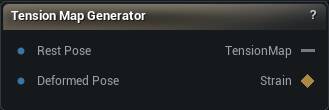
The Tension Map Generator node
When to use it
Compares a rest-pose mesh to a deformed one and bakes the per-vertex strain into a texture. Stretch where the surface is pulled apart at an outer elbow, compression where it is squeezed at an inner elbow or a furrowed brow, and optionally the principal strain direction for anisotropic effects. Drive a material that wrinkles or flushes with the pose.
Both meshes need the same vertex count and order. Strain is measured per vertex against its rest counterpart.
Generate and Export PNG are two separate actions on purpose. Generate computes the map and publishes it on the TensionMap pin without touching the disk or asking a question. Export PNG writes whatever Generate last produced, all UDIM tiles. Press only Export and you have exported nothing new.
How to use it
- 1
Connect the rest-pose mesh and the deformed-pose mesh
- 2
Configure the output settings
- 3
Click Generate
The
TensionMappin now carries a live texture. - 4
Optionally click Export PNG
Writes the map, all UDIM tiles, to disk.
Pins
| Pin | Type | Description |
|---|---|---|
RestPose |
Mesh | The mesh at rest, before anything pulls on it. |
DeformedPose |
Mesh | The same mesh in a pose. Vertex count and order have to match the rest pose. |
| Pin | Type | Description |
|---|---|---|
TensionMap |
Asset | The finished tension map. Linear, not sRGB, because it is data rather than colour. |
Strain |
Weight Map | The same per-vertex strain as a 0 to 1 weight map instead of a texture: 0.5 is neutral, higher is stretched, lower is compressed. Handy for driving a shader parameter or another node directly off the mesh, no UVs required. |
Settings
| Setting | Type | Description |
|---|---|---|
Resolution |
Whole number | Size of the output map, per UDIM tile. |
Format |
Choice | Which channels the map uses. |
UV Channel |
Whole number | Which UV channel the strain gets painted through. |
Enable UDIM |
True/False | Handle UVs that run outside the 0-1 square by making one image per tile. |
Max UDIM Tiles |
Whole number | How many tiles across to look at. Anything past this gets folded back into the last tile, so set it high enough to cover your layout. |
Texture File Base Name |
Text | File name Export PNG writes under. The UDIM number is added for you. |
Overwrite Existing |
True/False | Let Export PNG replace a file that is already there. |
| Setting | Type | Description |
|---|---|---|
Computation Method |
Choice | How the stretching gets measured. |
Sensitivity |
Number | Multiplies whatever strain was measured. Raise it to make small movement register; push it too far and every pose reads as a full stretch. |
Threshold |
Number | Strain weaker than this counts as zero. Nudge it up when the map is speckled in places nothing is actually moving. |
Max Stretch |
Number | Stretch this strong reads as fully white. Lower it to make gentle stretching visible; raise it if the map blows out to solid white. |
Max Compression |
Number | Compression this strong reads as fully white. Same trade as Max Stretch, for the bunching side. |
| Setting | Type | Description |
|---|---|---|
Fill Gaps |
True/False | Bleeds colour into pixels no triangle covered. Without it, dense areas leave pinholes where a triangle was too small to land on a pixel. |
Gap Fill Iterations |
Whole number | How far the bleed reaches, in pixels. |
Use Gaussian Blur |
True/False | Blur with a Gaussian instead of a box. Softer falloff, no boxy edges. |
Blur Passes |
Whole number | How many times the blur runs over the finished map. |
Blur Radius |
Whole number | How wide each blur pass reaches, in pixels. |
Vertex Smoothing Method |
Choice | How the strain is smoothed across the mesh before anything gets drawn. |
Vertex Smoothing Iterations |
Whole number | How many smoothing passes run on the mesh. One or two calms noisy strain. Too many and the sharp crease at an inner elbow spreads into a soft wash. |
Learn more
| Texture transfer with Mesh Morpher Graph | Read the walkthrough on meshmorpher.com | https://meshmorpher.com/blog/texture-transfer-with-mesh-morpher-graph |
Available in Mesh Morpher Graph and Mesh Morpher Studio.