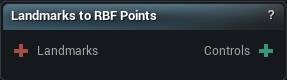
The Landmarks to RBF Points node
When to use it
Converts landmark pairs into RBF control points, which is how a handful of hand-placed anchors becomes a smooth deformation across the whole surface through the RBF Deformer.
What you get is a soft global warp. If you want the template to land on the target surface rather than be pulled toward it, Non-Rigid Fit is the node.
Side exists for symmetric meshes. Left or Right takes only that half's landmarks, which is what you want when the other half will be mirrored rather than solved.
Pins
| Pin | Type | Description |
|---|---|---|
Landmarks |
Landmarks | The landmarks to convert. Splines give up their control points only, not the points sampled along them. |
| Pin | Type | Description |
|---|---|---|
Controls |
RBF Points | One control point per landmark, on the side you picked. |
Settings
| Setting | Type | Description |
|---|---|---|
Side |
Choice | Which half of each landmark pair to take. Left gives you the source point, Right gives you the matching target point. |
Learn more
| RBF Deformer tool | Read the walkthrough on meshmorpher.com | https://meshmorpher.com/blog/rbf-deformer-tool-in-mesh-morpher |
| Modify MetaHuman RBF poses | Read the walkthrough on meshmorpher.com | https://meshmorpher.com/blog/modify-metahuman-rbf-poses |
Available in Mesh Morpher Graph and Mesh Morpher Studio.