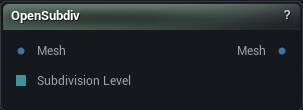
The OpenSubdiv node
When to use it
Subdivides mesh geometry with Pixar's OpenSubdiv, producing a smoother surface at a higher polygon count. This is the node for proper Catmull-Clark smoothing of a low-poly cage.
For more triangles without the smoothing, use Subdivide. For even triangle sizes rather than more of the same triangles, use Remesh.
Each level multiplies the triangle count around fourfold, so 5 or 6 on an already dense mesh will bring things to a crawl.
How to use it
- 1
Connect the input mesh
- 2
Set the subdivision level
Higher means more polygons.
- 3
Click Apply to subdivide
Pins
| Pin | Type | Description |
|---|---|---|
Mesh |
Mesh | The mesh to subdivide. |
Subdivision Level |
Whole Number | Drives the subdivision level from the graph. Leave it empty to use the value in the panel. Held to 1-6 either way. |
| Pin | Type | Description |
|---|---|---|
Mesh |
Mesh | The denser, smoother mesh. |
Settings
| Setting | Type | Description |
|---|---|---|
Subdivision Level |
Whole number | How many times to subdivide. Each level multiplies the triangle count around fourfold, so 5 or 6 on an already dense mesh will bring things to a crawl. |
Scheme |
Choice | Which subdivision rule to use. Catmull-Clark for the usual smooth result, Loop when the mesh is all triangles. |
Available in Mesh Morpher Graph and Mesh Morpher Studio.