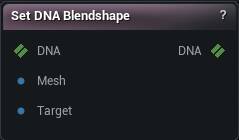
The Set DNA Blendshape node
When to use it
Replaces or adds one blendshape target in a DNA from a mesh you supply, and can propagate it down the LOD chain. Pair it with Get DNA Blendshape, keeping vertex layout and LOD identical between the two, or the deltas come out against the wrong base.
How to use it
- 1
Wire the DNA in
Put the unsculpted mesh on Mesh and your sculpted copy on Target.
- 2
Pick the blendshape to overwrite
- 3
Press Set Blendshape
The DNA output carries the new deltas. Mesh and Target must have the same vertex count and order, and both must match the DNA's own mesh at that LOD. Sculpt on a copy of DNA To Mesh, do not retopologise it.
Pins
| Pin | Type | Description |
|---|---|---|
DNA |
DNA | The DNA to write the blendshape into. |
Mesh |
Mesh | The mesh before you sculpted it. Same vertex count and order as the DNA's own mesh at that LOD. |
Target |
Mesh | The same mesh after sculpting. Whatever moved between these two becomes the blendshape. |
| Pin | Type | Description |
|---|---|---|
DNA |
DNA | The DNA with that blendshape rewritten. |
Settings
| Setting | Type | Description |
|---|---|---|
Blendshape Name |
Text | Which blendshape target to overwrite. The dropdown fills in from the DNA on the input pin, so wire that up first. |
Filter By Expression Name |
Text | Narrows the blendshape dropdown to the targets one expression drives. Empty means the whole file. |
Use Dual Quaternion Skinning |
True/False | Unskin your sculpt with dual quaternions instead of linear blending on the way back into the DNA. Set it the same way you set it on Get DNA Blendshape, or the shape you get back will not be the shape you sculpted. |
Add Missing Channel Indices |
True/False | Let the write create the blendshape channel on parts of the mesh that do not carry one yet. Turn it off and those parts are skipped: only meshes that already had that channel pick up the new shape. |
Create Missing Channel |
True/False | When Blendshape Name does not match any channel the DNA already has, add the channel itself rather than doing nothing. The new channel gets your sculpted shape but no expression driving it yet - it sits inert until you wire one in with Set DNA Expression or mm.dna's wire_expression_to_blendshape_channel. Off (the default) leaves an unknown name a no-op, same as today, but now with a card badge saying so instead of silence. |
New Channel LODs |
List of Whole number | Which LODs the newly created channel belongs to. Empty means just the LOD you are sculpting on (Mesh's own LOD Index). Only read when Create Missing Channel is on and the name did not already exist. |
Apply To LODs |
True/False | Also push the shape onto every coarser LOD, by projecting it from the LOD you sculpted on. Leave it off and only that one LOD carries the change. |
Vertex Threshold |
Number | How far the projection may reach to find the matching vertex on each coarser LOD. Too low and stretches of the LOD get no shape at all. Too high and the shape jumps a gap onto the wrong side of a fold. |
Normal Incompatibility Threshold |
Number | How far a triangle may face away from the one it matched before the projection refuses it. This is what stops LOD triangles turning inside out. |
Replace Entire Channel |
True/False | When on (the default), every mesh at this LOD that already has a target for this channel is rewritten: meshes this sculpt did not move get an empty target so leftover deltas from a previous pass cannot survive. Turn it off to keep per-mesh additive authoring (author the head in pass 1, eyelashes in pass 2). |
Skeletal Mesh |
Asset | Also writes this channel onto the mesh as a mesh__channel morph (engine Interchange name) so AnimNode_RigLogic can drive the corrective. Leave empty to only write DNA. |
Learn more
| Create a MetaHuman DNA expression from scratch | Read the walkthrough on meshmorpher.com | https://meshmorpher.com/blog/create-metahuman-dna-expressions-from-scratch |
| Modify MetaHuman RBF poses | Read the walkthrough on meshmorpher.com | https://meshmorpher.com/blog/modify-metahuman-rbf-poses |
| Modify DNA bone expressions | Read the walkthrough on meshmorpher.com | https://meshmorpher.com/blog/modify-meta-human-dna-bone-expressions-with-mesh-morpher |
| Custom DNA topology | Read the walkthrough on meshmorpher.com | https://meshmorpher.com/blog/custom-dna-topology-with-mesh-morpher-graph |
Available in Mesh Morpher Graph and Mesh Morpher Studio.