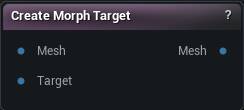
The Create Morph Target node
When to use it
Captures the difference between two meshes as a named morph target that rides along on the mesh wire. No asset anywhere, so it travels through the graph and through saves.
Pins
| Pin | Type | Description |
|---|---|---|
Mesh |
Mesh | The mesh before you sculpted it. |
Target |
Mesh | The same mesh after sculpting. Vertex counts have to match, or the node errors and passes the base mesh through. |
| Pin | Type | Description |
|---|---|---|
Mesh |
Mesh | Same base mesh, now carrying the new shape. It looks unchanged - Load Morph Target is what makes it visible. |
Settings
| Setting | Type | Description |
|---|---|---|
Morph Target Name |
Text | What to call the shape. Leave it blank and nothing is captured; the base mesh still passes through. |
Skeletal Mesh |
Asset | The Skeletal Mesh asset the write button targets. Editor only. |
LOD Index |
Whole number | Which LOD the shape is written into. Leave it at 0 unless you have a reason not to: the LOD settings below only run for LOD 0, and picking a LOD the asset does not have refuses the write. |
Use Dual Quaternion Skinning |
True/False | Un-pose the shape back onto the asset's bind pose with dual quaternion skinning instead of linear blend. Only the asset write uses this. |
Apply To LODs |
True/False | Push the shape down onto the lower LODs too, so it does not pop away as the character gets further from camera. |
Vertex Threshold |
Number | How far a LOD vertex can sit from the LOD0 surface and still pick the shape up. Too low and parts of the LOD stay flat; too high and the shape jumps a gap onto the wrong side of a fold. |
Normal Incompatibility Threshold |
Number | Throws away a match when the two surfaces face too differently. This is what keeps triangles from flipping inside out on the projected LOD. |
Smooth Type |
Choice | How the projected LOD shape gets smoothed. |
Smooth Strength |
Number | How hard each smoothing pass pulls. Does nothing while Smooth Iterations is 0. |
Smooth Iterations |
Whole number | How many smoothing passes to run over the projected LOD shape. 0 leaves it exactly as projected. Raise it when a coarse LOD comes out lumpy. |
Learn more
| Organize and categorize morph targets | Read the walkthrough on meshmorpher.com | https://meshmorpher.com/blog/organize-and-categorize-morph-targets-with-mesh-morpher-classic |
| Generate DNA bone expressions from morph targets | Read the walkthrough on meshmorpher.com | https://meshmorpher.com/blog/automatically-generate-mh-dna-bone-driven-expressions-from-morph-targets |
Available in Mesh Morpher Graph and Mesh Morpher Studio.