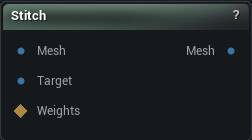
The Stitch node
When to use it
Joins two open boundaries into one continuous surface by matching border vertices, either by weights or by proximity. The step after Append Geometry or Replace Geometry when the pieces have to become one skin for sculpting, wrapping or a watertight export.
How to use it
- 1
Connect two meshes with matching boundaries
- 2
Pick the stitching method, weights or proximity
- 3
The output is the stitched mesh
Pins
| Pin | Type | Description |
|---|---|---|
Mesh |
Mesh | The mesh whose open border moves. |
Target |
Mesh | The mesh that stays put. The first mesh's border lands on this one's. |
Weights |
Weight Map | Paint here to stitch only part of the border. Leave it empty and the whole border is fair game. |
| Pin | Type | Description |
|---|---|---|
Mesh |
Mesh | The first mesh with its border sitting on the target's. Nothing is added or deleted, the border vertices just move. |
Settings
| Setting | Type | Description |
|---|---|---|
Selection Threshold |
Number | The weight a vertex has to beat before its part of the border gets stitched. A painted mask fades off gradually, but a triangle is either in or out, so this is where that soft edge turns into a hard yes or no. At 0, any vertex with any paint on it counts. |
Stitching Type |
Choice | How a border vertex finds its partner on the other mesh: by skin weights, or by distance. |
Use Edge Closest Point |
True/False | Land each vertex on the nearest point along the other border's edges instead of right on top of the vertex it matched. Keeps the seam smooth when the two borders have different vertex counts. |
Weight Threshold |
Number | How far apart two sets of skin weights may be and still count as a match. Too low and nothing pairs up, so the border sits exactly where it was. |
Vertex Threshold |
Number | How far a border vertex may reach to find its partner. Too far and it grabs the border on the other side of the opening, folding the edge back over itself. |
Available in Mesh Morpher Graph and Mesh Morpher Studio.