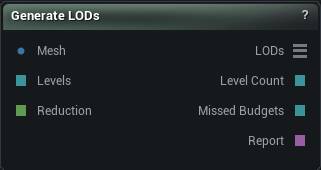
The Generate LODs node
When to use it
Builds a whole LOD chain from one mesh and puts it on a mesh-array wire, the type Get Mesh Array Element and the exporters already speak. A row of Simplify nodes does the same job worse: here the budgets stay in step, and every level is decimated from the original rather than from the level above it.
How to use it
- 1
Connect the source mesh
- 2
Choose a budget mode and how many levels you want
- 3
Press Generate LODs
The LODs pin carries the chain, level 0 first.
Pins
| Pin | Type | Description |
|---|---|---|
Mesh |
Mesh | The mesh you want LODs for. It comes back as level 0 untouched, and every reduced level is cut from it rather than from the level above. |
Levels |
Whole Number | Drives how many reduced levels get built. Leave it empty to use the value in the panel. Percentage Per Level mode only. |
Reduction |
Number | Drives the percentage each level keeps of the one before it. Leave it empty to use the value in the panel. Percentage Per Level mode only. |
| Pin | Type | Description |
|---|---|---|
LODs |
Mesh List | The whole chain, full-detail level first. Feed it to Get Mesh Array Element to look at one level. |
LevelCount |
Whole Number | How many levels came out, counting the untouched source as one of them. |
MissedBudgets |
Whole Number | How many levels came out heavier than you asked for. Anything above 0 means the chain is denser than the numbers you typed. |
Report |
Text | What each level actually came out as, next to the budget it was given. |
Settings
| Setting | Type | Description |
|---|---|---|
Budget Mode |
Choice | How you want to state the size of each level: as a percentage step down, or as exact triangle counts. |
Num Reduction Levels |
Whole number | How many reduced levels to build. The chain that comes out is one longer than this, because your untouched source sits at the front of it. |
Reduction Per Level |
Number | Percentage of the level above that each reduced level keeps. 50 halves the triangles every step. Budgets are worked out from the source count, so one level falling short of its number cannot drag the rest of the chain off target. |
Triangle Budgets |
Text | Triangle count for each reduced level, in order. Commas, semicolons or new lines all work as separators, so "30000, 12000, 5000" is fine. Each number has to be lower than the one before it, and the first has to be under the source's triangle count. Anything else gets refused with an error naming the entry rather than quietly reordered behind your back. |
Quality |
Choice | What the reducer works hardest to hang on to as it collapses edges. |
Preserve UVs |
True/False | Lock every UV and normal seam so UV islands cannot be merged or torn open. This is what keeps a textured asset looking textured all the way down the chain. |
Preserve Material Borders |
True/False | Lock the edges where one material meets another so sections keep their exact borders. Locked edges never collapse, so this eats into how far each level can reduce, and the deepest levels are the ones that fall short first. |
Preserve Group Borders |
True/False | Lock the edges between polygroups. Costs you the same reduction headroom that material borders do. |
Preserve Boundary |
True/False | Lock open edges so a cut-out piece keeps the exact shape of its border, and the original vertex density along it. This is the single most common reason a deep level cannot reach its budget, so turn it off when the report points here. |
Available in Mesh Morpher Graph and Mesh Morpher Studio.