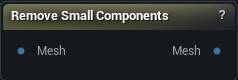
The Remove Small Components node
When to use it
Photogrammetry scans and marching-cubes surfaces leave confetti behind. This throws away every disconnected island under a triangle-count or surface-area threshold, in one press of Remove Small Components.
For junk that is connected but buried inside the model, Remove Occluded is the one.
On a mesh with uneven density, set the threshold by area rather than triangle count. Otherwise a dense speck survives while a sparse but real part gets deleted.
Nothing protects the largest island. A threshold above your actual model deletes everything, so when the output comes back empty, look at the result before you go hunting through the settings.
How to use it
- 1
Wire the mesh into Mesh
- 2
Set a triangle count, a surface area, or both
Either one on its own is enough; an island only has to fail one test to go.
- 3
Press Remove Small Components
A mesh that is all one connected piece is never touched, whatever the thresholds say. Once there are two pieces, neither is protected for being the bigger one, so set the thresholds under the size of the part you want to keep.
Pins
| Pin | Type | Description |
|---|---|---|
Mesh |
Mesh | The mesh with loose bits floating around it. |
| Pin | Type | Description |
|---|---|---|
Mesh |
Mesh | The mesh with the undersized islands gone. |
Settings
| Setting | Type | Description |
|---|---|---|
Min Area Island |
Number | Islands with less surface area than this get deleted. 0 turns the area test off. Being the biggest piece protects nothing, so keep this under the area of the part you want or it goes out with the scraps. |
Min Tri Count Island |
Whole number | Islands with fewer triangles than this get deleted. 0 turns the triangle test off. Same warning as the area threshold: the main body is not exempt. |
Available in Mesh Morpher Graph and Mesh Morpher Studio.