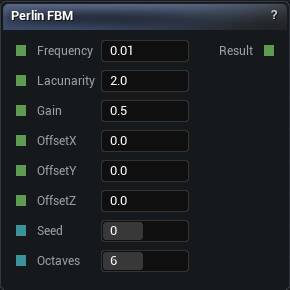
The Perlin FBM node
When to use it
Multi-octave Perlin. The default for natural-looking terrain, because real landscapes have detail at every scale and one octave does not.
Octaves cost linearly. Any octave finer than your voxel size is invisible work that also makes the mesher noisier, so match the highest frequency to the resolution you will actually bake at.
Pins
| Pin | Type | Description |
|---|---|---|
Frequency |
Number | How tight the biggest layer is. Everything else is built on top of it. |
Lacunarity |
Number | How much smaller each layer gets. At 2 every layer is half the size of the one before. |
Gain |
Number | How much quieter each layer gets. Low is crisp, high is rough and grubby. |
OffsetX |
Number | Slide the pattern along X. |
OffsetY |
Number | Slide the pattern along Y. |
OffsetZ |
Number | Slide the pattern along Z. |
Seed |
Whole Number | Change this for a different pattern at the same settings. The same seed always gives you the same noise. |
Octaves |
Whole Number | How many layers to stack. Past about 8 you are paying for detail finer than your voxels can show. |
| Pin | Type | Description |
|---|---|---|
Result |
Number | The noise here. Roughly -1 to 1. |
Available in Mesh Morpher Graph and Mesh Morpher Studio.