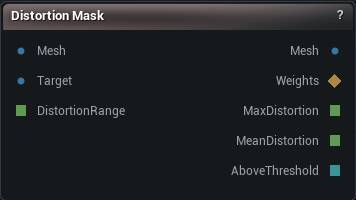
The Distortion Mask node
When to use it
Measures per-vertex stretch between two meshes that share vertex count and order, and hands you a 0 to 1 weight map. This is how you find the regions a conform, a wrap or a pose damaged, instead of hunting for them by eye.
How to use it
- 1
Wire the mesh as it is now into Mesh, and the same mesh from before the damage into Target
- 2
Press Measure
Max Distortion in the details panel is in log units, so 0.69 means something on this mesh doubled in size.
- 3
Wire Weights into Guided Delta Mush to relax the damage, or into a mask to look at it
Pins
| Pin | Type | Description |
|---|---|---|
Mesh |
Mesh | The mesh as it is now, the one being measured. Passes straight through untouched. |
Target |
Mesh | The same mesh before whatever conform or wrap you suspect. Vertex count and order have to match. |
DistortionRange |
Number | How much change maps to a weight of 1.0, in log units; 0 is auto. Leave it unconnected to use the value in the details panel. |
| Pin | Type | Description |
|---|---|---|
Mesh |
Mesh | The input mesh, unchanged. |
Weights |
Weight Map | Distortion per vertex, scaled to 0-1. All zeroes when the two meshes match. |
MaxDistortion |
Number | The worst raw distortion on the mesh, in log units (0.69 is a doubling). Branch on this, not on the weight map, which is scaled and says nothing about how bad it actually got. |
MeanDistortion |
Number | Average raw distortion across the vertices that could be measured. |
AboveThreshold |
Whole Number | How many vertices went past Report Threshold. |
Settings
| Setting | Type | Description |
|---|---|---|
Metric |
Choice | What counts as distortion: change in edge length, or change in the area around each vertex. |
Direction |
Choice | Whether stretching, squashing or both show up in the mask. |
Distortion Range |
Number | How much change maps to a weight of 1.0, in log units. Zero means auto: scale against the worst vertex on this mesh, so the mask always fills the whole 0-1 range. Pin it to a number (0.69 is a doubling, 0.1 is a ten percent change) when you compare masks across several meshes, or a clean mesh's rounding noise ends up looking exactly like a torn mesh's tear. |
Report Threshold |
Number | Vertices whose raw, un-normalised distortion goes past this get counted on the Above Threshold pin. Same log units as Max Distortion. |
Available in Mesh Morpher Graph and Mesh Morpher Studio.