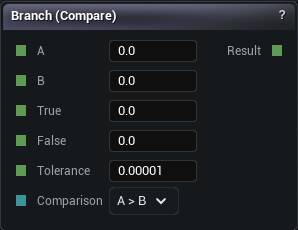
The Branch node
When to use it
Compares A and B with the operator you pick and forwards True or False accordingly. The comparison and the choice in one node.
Equal and NotEqual read the Tolerance pin, which defaults to 0.00001. That default is doing real work. Two values that came out of any arithmetic almost never land on the same float, so an Equal branch with Tolerance set to 0 takes the false arm over and over and reads as a broken wire.
When the result is a weight rather than a choice, Compare plus a multiply is cleaner. When the boundary should be soft, Select.
Pins
| Pin | Type | Description |
|---|---|---|
A |
Number | The left side of the comparison. |
B |
Number | The right side of the comparison. |
True |
Number | Passed through when the comparison holds. |
False |
Number | Passed through when the comparison does not hold. |
Tolerance |
Number | Only matters for Equal and Not Equal. Two values closer together than this count as the same. |
Comparison |
Choice | Which test to run. Wire a Compare Op node in here to switch it from the graph. |
| Pin | Type | Description |
|---|---|---|
Result |
Number | Whichever of True and False the comparison picked. |
Available in Mesh Morpher Graph and Mesh Morpher Studio.