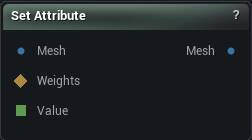
The Set Attribute node
When to use it
Start with the mental model, because the word "attribute" is the only hard part: you are storing a number on each vertex so you can read it back later, or move it to another mesh.
- This node is the store step.
- Get Attribute is the read-it-back step.
- Transfer Attribute is the move-it step.
- A Wrangle can read and write the same number as
@name.
The number rides inside the mesh itself, so it survives every wire, every save and every node that passes the mesh along - it is not a side channel you have to keep re-connecting. That is what makes it worth using instead of just wiring a weight map around.
Store Per is the choice that matters. One value per vertex is what you want almost always - masks, heights, heat, anything a weight map could hold. One value per triangle is for facts about faces: material class, an area band, a flag. Pick the wrong one and everything downstream still works but has to average, which blurs the data.
Pins
| Pin | Type | Description |
|---|---|---|
Mesh |
Mesh | The mesh to store the value on. |
Weights |
Weight Map | Per-vertex values. Only read when Value Source is set to Weights input. |
Value |
Number | Drives the X component of Constant Value from the graph. Leave it empty to use the panel value. |
| Pin | Type | Description |
|---|---|---|
Mesh |
Mesh | The same mesh, now carrying the value under that name. |
Settings
| Setting | Type | Description |
|---|---|---|
Name |
Text | The name you will look this up by later. Case-sensitive, so Mask and mask are two different things. Leave it empty and the node does nothing. |
Store Per |
Choice | One value per vertex, or one per triangle. Changing this rebuilds the stored value from scratch. |
Type |
Choice | How many numbers each vertex or triangle holds. Changing this rebuilds the stored value from scratch; nothing is reinterpreted in place. |
Value Source |
Choice | One value everywhere, or per-vertex values from the Weights input. |
Constant Value |
Vector | The value every vertex or triangle gets. Components past the chosen Type are ignored, and Float and Int only read X. X can also be driven by the Value pin, so the graph can work the number out for you. |
Constant W |
Number | The fourth number. Only read when Type is Vector 4. |
Driven Component |
Whole number | Which component the Weights input writes into. 0 is X. Clamped to however many the chosen Type has. |
Available in Mesh Morpher Graph and Mesh Morpher Studio.