Frequently Asked Questions
Find answers to common questions about Mesh Morpher licenses, features and support
User Account and Subscriptions
I'm asked to verify my email address with the new website.
Due to our website migration, existing users are required to re-verify their email addresses and set new password.
How can I request a trial?
To request a Trial you need to create a user account and navigate to Licenses page and Request a Trial. Only new users can request a trial.
If approved, user will receive an email with the trial license key and will also be able to see the license in their dashboard.
Do I need to pay for subscription after the product was shipped?
No, the subscription is required only for editor. As long as you use Mesh Morpher in editor you need a subscription. Once you don't use Mesh Morpher anymore or you package your game, you don't need a subscription.
I subscribed. How can I get Mesh Morpher?
Once your subscription is confirmed, you can navigate to Licenses and download Mesh Morpher for the required platform. Please note that download links are available for 15 minutes and once they expire, you have to refresh the page.
Can I purchase multiple subscription types at once?
Yes, you can have as many subscriptions you want.
What do I get with the subscription?
With your subscription you receive access to Mesh Morpher for Editor and Runtime.
All Mesh Morpher modules are pre-compiled and can be packaged with UnrealGame target builds.
Public PDB included with all Mesh Morpher versions.
For other builds(client, server etc) reach out to us.
How can I cancel a subscription?
Navigate to Licenses and press Cancel on the Subscription you wish to cancel
What happens if I cancel my subscription during my subscription period?
If you cancel your subscription, the license will still be active until the end of the subscription term, but it won't be renewed at the end that term.
I cancelled my subscription but I want to subscribe again
In case you cancelled a subscription and want to subscribe again, you can always purchase a new one.
I need to change my License Key.
If you leaked your License Key, contact us and we will sort it out.
I subscribed but can't find my receipt.
Receipts are delivered to email by our Payment Processor(Paddle). Contact us if you lost a receipt.
How to disable auto-renewal of my license?
Simply cancel the subscription and it won't be automatically renewed.
Can I get my work featured in the Community section?
Sure, send us a video along with your contact details and if your work stands out we will post it.
Installation and Activation
What UE versions and operating systems are supported?
Mesh Morpher currently supports following Engine versions:
UE 5.0 (Legacy)
UE 5.1 (Legacy)
UE 5.2 (Legacy)
UE 5.3 (Legacy)
UE 5.4 (Legacy)
UE 5.5 (Legacy)
UE 5.6
UE 5.7
UE 5.8
Mesh Morpher supports Windows (x64).
How do I install Mesh Morpher?
-
Download the .zip file associated with the Unreal Engine version and OS you're using by navigating to Licenses
-
Create a Plugins folder inside your Project folder
-
Unzip the downloaded file to YourProject/Plugins

How do I update Mesh Morpher?
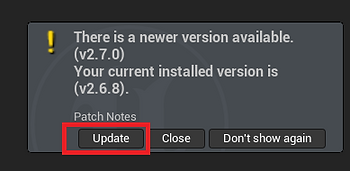
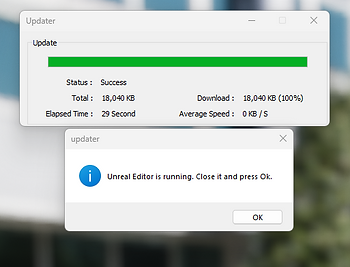
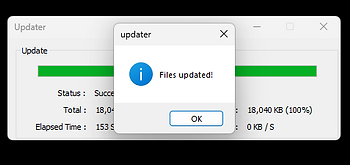
For versions prior to 2.7.0 and Mac Users:
Download the .zip file associated with the Unreal Engine version and OS you're using by navigating to Licenses. Unzip the file where you initially installed it, either your Project/Plugins folder or UE_5.X/Engine/Plugins/Marketplace folder, and overwrite the files
How do I activate Mesh Morpher?
To activate Mesh Morpher, you need to first open it in Unreal Engine and a Login window will show.
Mesh Morpher requires an active internet connection to authenticate and keep the authentication alive.
On purchase, you received an email from us with your License details, but you can also found the details here: Licenses
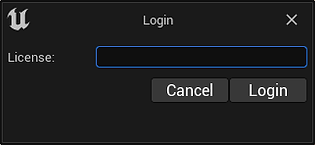
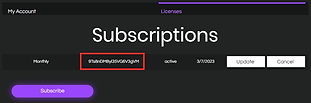
I always get error: Invalid Token. Unable to communicate with the server or the license is being used somewhere else.
This error occurs when the license is used on another computer at the same times as yours.
It can also occur when the validation server couldn't be reached 3 consecutive times.
I installed Mesh Morpher but I get missing modules error message
If you installed Mesh Morpher in the Engine's Marketplace folder and you get the bellow message:
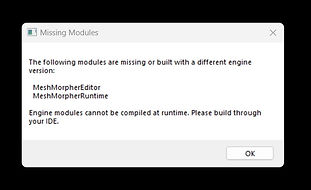
Make sure you uninstall any other versions of Mesh Morpher(Lite etc).
How about security?
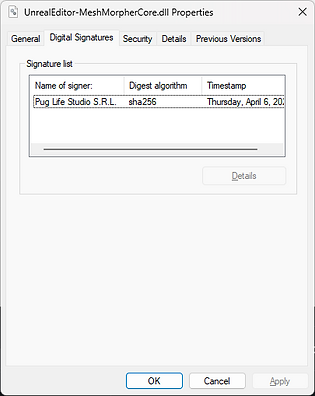
All binary files distributed with Mesh Morpher are digitally signed by Pug Life Studio S.R.L.
Mesh Morpher crashes every time I launch it
This is a very rare bug that occurs due to some engine issues while saving layouts and configs.
Try to delete these files: C:\Users\<username>\AppData\Local\UnrealEngine\Editor\EditorLayout.json and C:\Users\<username>\AppData\Local\UnrealEngine\5.4\Saved\Config\WindowsEditor\EditorLayout.ini
If the problem is not solved, deleting the entire C:\Users\<username>\AppData\Local\UnrealEngine folder sorts it out.
<username> is your Windows user.