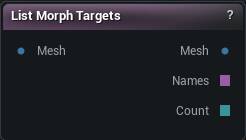
The List Morph Targets node
When to use it
Tells you which morph targets a mesh is carrying, and passes the mesh through untouched.
This is what you reach for the moment a morph question turns into "did that actually do anything". Morph targets live inside the mesh as vertex deltas, so a mesh carrying fifty of them and a mesh carrying none look identical in the viewport, on the wire and in a thumbnail. The names go on the node card and out on Names, one per line, with Count for the graph to branch on.
It never writes the mesh output, so dropping one into a working chain cannot change what flows down it. To actually see a shape rather than confirm it exists, apply it with Load Morph Target.
How to use it
- 1
Connect any mesh
- 2
Read the names off the card, or wire Names / Count into the graph
Pins
| Pin | Type | Description |
|---|---|---|
Mesh |
Mesh | The mesh you want to look inside. |
| Pin | Type | Description |
|---|---|---|
Mesh |
Mesh | The same mesh that came in, untouched. Safe to drop this node into the middle of a chain. |
Names |
Text | The names on the mesh, one per line, sorted. Blank when it carries none. |
Count |
Whole Number | How many the mesh carries. A zero means none; a blank pin means no mesh reached the node at all. |
Learn more
| Organize and categorize morph targets | Read the walkthrough on meshmorpher.com | https://meshmorpher.com/blog/organize-and-categorize-morph-targets-with-mesh-morpher-classic |
| Generate DNA bone expressions from morph targets | Read the walkthrough on meshmorpher.com | https://meshmorpher.com/blog/automatically-generate-mh-dna-bone-driven-expressions-from-morph-targets |
Available in Mesh Morpher Graph and Mesh Morpher Studio.