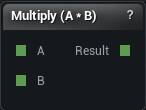
The Scalar Math node. Its title follows the operation you pick.
When to use it
Adds, subtracts, multiplies or divides two numbers. This is how a graph computes a setting from another value instead of hard-coding it: half the source triangle count, twice the measured distance.
Divide by zero is reported as a node error and publishes nothing, rather than emitting an infinity or a silent zero. An infinity travelling into a mesh operation as an edge length or a vertex budget would blow up there, and you would blame the mesh node.
When nothing is published, the consumer falls back to its own setting. That is what a downstream node quietly ignoring its wire looks like.
Pins
| Pin | Type | Description |
|---|---|---|
A |
Number | The number on the left of the sum. Leave it unwired and the panel value is used. |
B |
Number | The number on the right of the sum. Leave it unwired and the panel value is used. |
| Pin | Type | Description |
|---|---|---|
Result |
Number | The answer. |
Settings
| Setting | Type | Description |
|---|---|---|
Operation |
Choice | Which sum to do with A and B. |
A |
Number | The number on the left of the sum. The A pin overrides it. |
B |
Number | The number on the right of the sum. The B pin overrides it. |
Available in Mesh Morpher Graph and Mesh Morpher Studio.