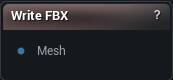
The Write FBX node
When to use it
For a handoff to a DCC package where the rig has to survive, FBX is the format and this is the node. It goes out through the bundled FBX SDK.
How to use it
- 1
Connect a mesh to the Mesh input pin
- 2
Tweak axis / scale / ASCII settings on the details panel
- 3
Click Write FBX — choose a destination, file is written
Pins
| Pin | Type | Description |
|---|---|---|
Mesh |
Mesh | The mesh to save. Bones, skin weights, UVs and materials all come through. |
Settings
| Setting | Type | Description |
|---|---|---|
Coordinate System |
Choice | Handedness written into the file's header, so the app opening it knows which way round the mesh is meant to be. |
Front Axis |
Choice | Which axis the file should call forward. |
Up Axis |
Choice | Which axis the file should call up. Set it to Y for Maya, leave it on Z for anything coming back into Unreal. |
Scale |
Number | Multiplies every vertex position on the way out. Leave it at 1 to keep the mesh at the size it is here. |
Export As ASCII |
True/False | Writes readable text instead of binary. Handy when you need to look inside the file, but it runs about five times bigger. |
Vertex Colors |
Choice | What goes into the vertex-colour layer: the mesh's own colours, one flat colour per material section (the same colours the sculpt viewport shows in Section Colors), or nothing. |
Available in Mesh Morpher Graph and Mesh Morpher Studio.