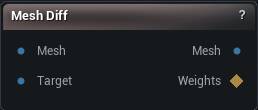
The Mesh Diff node
When to use it
Two meshes in, per-vertex distance out as a normalised weight map, with the minimum, maximum and average alongside it in the details panel. The first mesh passes through unchanged.
How to use it
- 1
Connect Mesh and Target
- 2
Choose a Topology Mode
- 3
Set the distance threshold and the display range
- 4
Click Compare
- 5
Send WeightMap into Apply Weight Map, Blend or Delta Mush to mask with it
Pins
| Pin | Type | Description |
|---|---|---|
Mesh |
Mesh | The mesh being measured. The weight map is sized to this one. |
Target |
Mesh | The mesh it gets measured against. |
| Pin | Type | Description |
|---|---|---|
Mesh |
Mesh | The input mesh, unchanged. |
WeightMap |
Weight Map | Distance per vertex, scaled to 0-1. Dark where the two agree, bright where they part. |
Settings
| Setting | Type | Description |
|---|---|---|
Topology Mode |
Choice | How vertices get paired up between the two meshes. |
Distance Threshold |
Number | Anything further apart than this is counted in the Vertices Above Threshold readout. It only feeds that number. The weight map ignores it. |
Max Display Distance |
Number | The distance that comes out as a full weight of 1. Left at 0 it uses the biggest distance it found, which rescales the map on every run and makes two runs impossible to compare by eye. Type a real number in once you know your range. |
Available in Mesh Morpher Graph and Mesh Morpher Studio.