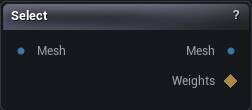
The Select node
When to use it
Mark triangles by hand with the viewport's selection brush, then accept to emit the selection and the clipped mesh. When the region is a judgement call rather than something measurable, this beats deriving one with Weight Map To Selection.
How to use it
- 1
Connect a mesh and select the node to pick up the brush
- 2
Paint the triangles you want in the viewport
- 3
Press Accept
Weights carries the mask, Mesh carries the trimmed geometry.
Pins
| Pin | Type | Description |
|---|---|---|
Mesh |
Mesh | The mesh you paint on. |
| Pin | Type | Description |
|---|---|---|
Mesh |
Mesh | Just the triangles you painted, cut out as their own mesh. Passes the whole mesh through when nothing is selected. |
Weights |
Weight Map | The painted mask, brush falloff and all: 1 is fully selected, 0 is untouched. These line up with the input mesh's vertices, not with the trimmed Mesh output, which gets renumbered. Selection Threshold cuts the Mesh output only, never these weights. |
Settings
| Setting | Type | Description |
|---|---|---|
Selection Threshold |
Number | A painted vertex counts as selected once its weight reaches this. The cut keeps or drops whole triangles, so the soft brush edge has to become a yes or no somewhere, and this is where. At 0 the faintest touch of the falloff drags a triangle in. It trims the Mesh output only; the Weights output keeps its falloff either way. Two catches. There is only a falloff to cut when Full Strength Mask is off, under Masking > Draw. With the default on, the brush stamps a hard 1.0 and the marquee and Sections list seed exactly 1.0, so every value above 0 picks the same triangles. And the viewport never previews the cut: hide-unselected isolates anything you have painted at all, so a feathered mask accepts tighter than the region you were looking at. |
Occlusion Test Method |
Choice | How hidden geometry is judged. Fast winding is quick and catches sealed pockets inside a closed mesh; ray visibility fires rays out of each face and is the safer choice on an open or messy mesh. |
Triangle Sampling |
Choice | Where on each triangle the hidden-or-not test is taken. |
Winding Iso Value |
Number | The cutoff that separates inside from outside for the winding test. 0.5 is standard; raise it to select less, lower it to select more. |
Add Random Rays |
Whole number | Extra rays in random directions on top of the six axis rays. Raise it when the ray test leaves slivers of hidden surface unselected. |
Add Triangle Samples |
Whole number | Extra sample points scattered over each triangle. Raise it when a big triangle is missed because only a corner of it happens to be hidden. |
Grow Shrink |
Whole number | Reach the selection outward (+) by a ring or two to catch the rim around a cavity, or pull it inward (-) to keep clear of the visible surface. Counts in rings of vertices. |
Invert |
True/False | Flip it: select everything you can see from outside instead of what you cannot. |
Available in Mesh Morpher Graph and Mesh Morpher Studio.