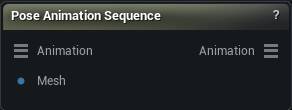
The Pose Animation Sequence node
When to use it
Poses the skeleton at a chosen frame of an animation and writes the edit back into the bone keys, blended over Falloff Frames on each side of the posed frame and fading with distance. The selected range is a hard boundary the edit never crosses - narrow it to protect a section of the take regardless of how large the falloff is.
How to use it
- 1
Connect an Animation input (from a Load Animation node) and the rest rigged mesh the animation plays on
- 2
Select the node, scrub to a frame, pose the skeleton with the gizmo, Accept
- 3
Wire the Animation output into Save Animation Sequence to write it back into an asset
Pins
| Pin | Type | Description |
|---|---|---|
Animation |
Animation | The animation whose bones you want to edit, from a Load Animation node. |
Mesh |
Mesh | The rest-pose rigged mesh the animation plays on. It is the bind reference the posing skins from, so it must be at rest, not already posed. |
| Pin | Type | Description |
|---|---|---|
Animation |
Animation | The same animation with your bone edits written into its keyframes. |
Settings
| Setting | Type | Description |
|---|---|---|
Use Dual Quaternion Skinning |
True/False | Skin with dual quaternions instead of linear blend when posing the frame baseline. |
Include Root Bone |
True/False | Include the root bone in the blended edit. Root edits shift the whole take - that is a root motion edit, not a pose fix, so it is off by default. |
Falloff Frames |
Whole number | How many frames on each side of the current frame the edit blends into, fading out with distance. 0 keys only the frame you posed. The selected range is a hard boundary - frames outside it are never touched no matter how large the falloff. |
Learn more
| Delta Mush in Mesh Morpher Graph | Read the walkthrough on meshmorpher.com | https://meshmorpher.com/blog/delta-mush-in-mesh-morpher-graph |
| ML Deformer and MetaHuman facial expressions | Read the walkthrough on meshmorpher.com | https://meshmorpher.com/blog/ml-deformer-and-meta-human-facial-expressions |
Available in Mesh Morpher Graph and Mesh Morpher Studio.