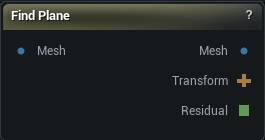
The Find Plane node
When to use it
Estimates the dominant mirror plane of a scan when you do not already know which axis it sits on, or when the scan arrived rotated off the sculpt X plane.
How to use it
- 1
Wire the scan into Mesh
- 2
Press Find Plane
Read Closest Axis and Residual.
- 3
Tick Align To X if you want the mesh rotated onto the sculpt X plane; the Transform pin is written either way so Apply Rigid Transform can consume it without moving this mesh
Pins
| Pin | Type | Description |
|---|---|---|
Mesh |
Mesh | The mesh whose mirror plane you want to find. Passes straight through until you press Find Plane. |
| Pin | Type | Description |
|---|---|---|
Mesh |
Mesh | The input mesh, or the same mesh rotated onto X if Align To X is on. |
Transform |
Transform | The rigid transform that would align the found plane to X. Written even when the mesh is left unmoved. |
Residual |
Number | How far the estimated plane is from a perfect mirror. Blank when the run was refused. |
Settings
| Setting | Type | Description |
|---|---|---|
Max Samples |
Whole number | How many vertices to sample. More is slower and a little more stable. |
Align To X |
True/False | Rotate the mesh so the found plane becomes the X axis. Off leaves the mesh where it is and still writes the Transform pin. |
Snap Aligned Plane To Origin |
True/False | After aligning, slide the plane onto the world origin. |
Available in Mesh Morpher Graph and Mesh Morpher Studio.