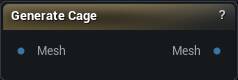
The Generate Cage node
Press Generate Cage, then feed the result into the Cage Deformer's Cage input. Density and the two smoothing settings are what you tune. It runs on the GPU and needs one that supports compute shaders.
Pins
| Pin | Type | Description |
|---|---|---|
Mesh |
Mesh | The mesh to wrap. |
| Pin | Type | Description |
|---|---|---|
Mesh |
Mesh | The finished cage. Wire it into the Cage Deformer's Cage input. |
Settings
| Setting | Type | Description |
|---|---|---|
Density |
Number | How fine the cage comes out. Small nudges do almost nothing - it takes roughly four times the value to double the cage resolution, so move it in big steps. Push it far enough and the cage has as many points to drag as the mesh you were trying to avoid dragging. |
Smooth Strength |
Number | How hard each smoothing pass pulls the cage in. The cage starts life as a blocky shell of voxels, and this is what rounds it off. Anything above 1 behaves the same as 1. |
Smooth Iterations |
Whole number | How many smoothing passes to run. At 0 you get the raw stair-stepped shell; too many and the cage shrinks in through the mesh it is meant to enclose. |
Bounding Box Offset |
Number | How much room to leave around the mesh, as a fraction of the mesh's own size. 0.15 pads it by 15 percent on every side. This padding is what absorbs the shrink from smoothing, so raise it if the cage ends up cutting through the surface. |
Available in Mesh Morpher Graph and Mesh Morpher Studio.