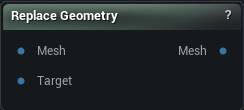
The Replace Geometry node
When to use it
Swaps the triangles of one material slot for geometry from a second mesh, re-transferring skin weights and remapping materials so the result stays rigged and shaded. A new head on the same body, a higher-detail hand.
The slot is named rather than selected because a material slot is the stable handle for "this part". When the region is not cleanly one slot, Remove Geometry plus Append Geometry does the same job by hand.
Expect a seam. The replacement's border rarely lands exactly on the original's, so follow with Stitch Mesh or Weld Mesh, and check the weight transfer around the join before you animate anything.
How to use it
- 1
Connect the source mesh and the replacement geometry
- 2
Name the material slot and configure the weight transfer
- 3
Click Apply to replace the geometry
Pins
| Pin | Type | Description |
|---|---|---|
Mesh |
Mesh | The mesh being changed. Pick the slot to swap out in Material Name. |
Target |
Mesh | The new geometry going in. Line it up with the part it is replacing before you run this. |
| Pin | Type | Description |
|---|---|---|
Mesh |
Mesh | The mesh with that slot swapped out for the new geometry. |
Settings
| Setting | Type | Description |
|---|---|---|
Material Name |
Text | Which material slot gets replaced. Every triangle using it is deleted and the incoming geometry takes its place. |
Replace Weights Method |
Choice | How the replacement geometry gets its skin weights: none at all, rigidly bound to one bone, or transferred off the mesh it is going into. |
Parent Bone |
Text | Every vertex of the replacement is bound to this one bone at full weight. Good for rigid parts like a helmet or a shoulder plate. |
Radius Percentage |
Number | How far a vertex looks for weights, as a fraction of the replacement's bounding box diagonal. Anything further away is ignored, and those vertices get filled in by the smoothing pass instead. Set it to -1 to search the whole mesh. |
Normal Threshold |
Number | Throw away a match when the two normals point more than this many degrees apart. Keeps the inside of a sleeve from grabbing weights off the arm underneath it. Set it to -1 to ignore normals entirely. |
Layered Mesh Support |
True/False | Retry with the normal flipped when a match fails the angle test above. Turn this on for clothing that hugs a body, where the inner and outer surfaces sit close together and face opposite ways. |
Smoothing Iterations |
Whole number | Smoothing passes over the vertices that found no match and had their weights filled in. More passes soften the join into the transferred area. |
Smoothing Strength |
Number | How far each smoothing pass pulls a filled-in weight toward its neighbours. |
Max Bone Influences |
Whole number | Most bones any single vertex may be weighted to. Drop it to whatever limit your engine or exporter expects. |
Available in Mesh Morpher Graph and Mesh Morpher Studio.