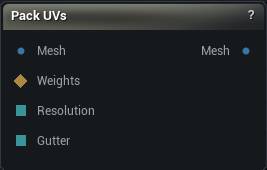
The Pack UVs node
When to use it
Repacks the UV islands of one channel into the unit square, moving only islands that already exist.
An atlas generated once is rarely laid out the way the asset finally needs it, and re-running Generate UVs to change the layout throws away the seams and the unwrap along with it. This is the step in between: same islands, same distortion, tighter arrangement.
It needs UVs to work with. On a mesh that has none, Generate UVs comes first.
How to use it
- 1
Connect a mesh that already has UVs
From Generate UVs, or an imported asset.
- 2
Pick the channel, the resolution you will bake at and a gutter
- 3
Optionally connect Weights to repack only the selected islands
- 4
Click Pack UVs
Pins
| Pin | Type | Description |
|---|---|---|
Mesh |
Mesh | The mesh to repack. It needs UVs in the chosen channel already - this node will not make them. |
Weights |
Weight Map | Optional. Repack only the islands this selection touches. Leave it empty to repack everything. |
Resolution |
Whole Number | Texture Resolution, taken from the graph instead of the details panel. |
Gutter |
Whole Number | Gutter Texels, taken from the graph instead of the details panel. |
| Pin | Type | Description |
|---|---|---|
Mesh |
Mesh | The mesh with the chosen channel repacked. The other channels come out untouched. |
Settings
| Setting | Type | Description |
|---|---|---|
UV Channel |
Whole number | Which UV channel to repack. The others come out untouched. |
Pack Mode |
Choice | How the islands get laid out. |
Texture Resolution |
Whole number | The size of the texture you plan to bake at. It turns the gutter below from a pixel count into a real UV distance, and it limits how small an island is allowed to get. |
Gutter Texels |
Whole number | Blank space left between islands, counted in pixels of the texture above. Set it too low and a bake bleeds across an island edge, or the low mips smear the shoulder into the ear. 2 to 4 is normal. Go higher when the texture will be seen mostly from a distance. |
Allow Rotation |
True/False | Lets islands turn so they nest tighter. Switch it off to keep every island the way you authored it, which keeps checker squares square and the layout readable. You give up some coverage for that. |
Allow Flips |
True/False | Lets islands mirror as well as turn. Buys a little more coverage and does no harm on symmetric detail, but any text or directional pattern painted into the texture will read backwards. Ignored while Allow Rotation is off. |
Selection Threshold |
Number | A vertex counts as selected once its weight reaches this. Only read when something is plugged into Weights. |
Available in Mesh Morpher Graph and Mesh Morpher Studio.