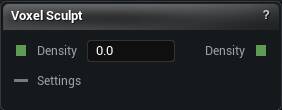
The Sculpt Density node
When to use it
Carve the voxel surface with brushes instead of describing every bump with maths. Add, Subtract, Clay, Smooth, Flatten, Grab, Pinch, Erase and more. Select the node to pick the tools up. Deselect it and they go away.
Pins
| Pin | Type | Description |
|---|---|---|
Density |
Number | The shape you are sculpting on. Leave it empty and you start from nothing. |
Settings |
Voxel Settings | Wants a Generate Settings node: blocky or smooth, how fine the voxels are, how far to look for the surface. Share one settings node with Density to Mesh and what you sculpt is exactly what you bake. |
| Pin | Type | Description |
|---|---|---|
Density |
Number | The shape with your strokes in it. Send it on to more density nodes, or to Density to Mesh when you want real geometry. |
Settings
| Setting | Type | Description |
|---|---|---|
Composition Mode |
Choice | How your strokes meet the shape underneath. Add piles them on top, Replace swaps them in wherever you touched, Max and Min keep whichever of the two is stronger or weaker. |
Current Brush |
Text | Which brush a click or a drag uses. |
Brush Rate |
Number | How many times a second the brush fires while you hold the button down. A single click always lands once. Crank it up and held strokes build much faster. Size, strength and falloff come from the viewport Brush controls, same as mesh sculpting. |
Flatten Band Voxels |
Number | Flatten brush. How thick a slab either side of the brush plane gets pulled flat, in voxels. Bigger reaches deeper in one pass. |
Clay Lift Ratio |
Number | Clay brush. How far above the surface to build, as a share of the brush radius. At 0 it fills up to the surface and no further. Raise it for a thicker slab per pass. |
Noise Type |
Choice | Noise brush. Which flavour of noise to stamp. |
Noise Fractal |
Choice | Noise brush. Layers of noise stacked on the basic pattern. None is one plain layer; the others pile several on for more detail. |
Noise Octaves |
Whole number | Noise brush. How many layers to stack. More layers, finer detail, more time per stroke. |
Noise Frequency |
Number | Noise brush. How big the pattern is in the world. Higher numbers give you tighter, finer wobble. |
Noise Seed |
Whole number | Noise brush. Change this for a different random pattern at the same settings. |
Available in Mesh Morpher Graph and Mesh Morpher Studio.