Editor-only node. Runs only in Mesh Morpher Graph inside the Unreal Editor, because it reads or writes Unreal Engine assets. Not available in the standalone Mesh Morpher Studio app.
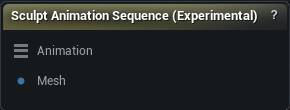
The Sculpt Animation Sequence (Experimental) node
When to use it
Sculpt corrective shapes directly on a playing animation, frame by frame, then bake them into the sequence as animation-driven morph targets. Editor only.
How to use it
- 1
Connect an Animation input (from a Load Animation node) and a rest-pose mesh that comes from skeletal mesh import data
- 2
Select the node, pick a frame range, sculpt, Accept
- 3
Click Save to bake morph targets into the sequence
Pins
| Pin | Type | Description |
|---|---|---|
Animation |
Animation | The animation to sculpt on, from a Load Animation node. This is also the sequence Save writes the morph curves into. |
Mesh |
Mesh | The rest-pose mesh. It has to come from a skeletal mesh import, because that is the asset the baked morph targets land on. |
Settings
| Setting | Type | Description |
|---|---|---|
Capture Baseline From GPU |
True/False | Take the posed shape from what the renderer actually draws, so anything a post-process Anim Blueprint, a deformer graph or a morph curve adds is already in the mesh you sculpt on. Needs a live sequence on the Animation input. Turn it off to pose from the raw keyframes instead: exact and instant, but blind to everything those three add. |
Name |
Text | What the morph targets get called. They come out numbered from this, one per processed frame, so keep it short and recognisable in the asset. |
Apply To LODs |
True/False | Push the shapes down onto the lower LODs too, so they do not pop away as the character gets further from camera. |
LOD Vertex Threshold |
Number | Same distance rule as the main projection, but for landing the shape on the lower LODs. |
LOD Smooth Type |
Choice | How the shape gets smoothed on the lower LODs. |
LOD Smooth Strength |
Number | How hard each LOD smoothing pass pulls. Does nothing while LOD Smooth Iterations is 0. |
LOD Smooth Iterations |
Whole number | How many smoothing passes to run on the lower LODs. Coarse LODs usually need a pass or two where LOD0 needs none. |
Use Dual Quaternion Skinning |
True/False | Dual quaternion skinning instead of linear blend. Keeps volume on a twisted forearm or wrist, where linear blend pinches the mesh into a candy wrapper. |
Use Linear Interpolation |
True/False | Ramp each morph target's weight in and out with linear keys instead of switching it on and off at full strength. Off, the correction pops the frame it starts on. |
Transition Frames |
Whole number | How many frames that ramp takes at each end. 1 fades in over a single frame; raise it for a softer hand-off on a slow take. Only read when Use Linear Interpolation is on. |
Fade In Frames |
Whole number | Frames at the start of the selected range over which the correction ramps up from nothing. 0 makes it pop on fully at the first frame. |
Fade Out Frames |
Whole number | Frames at the end of the selected range over which the correction ramps back down to nothing. 0 makes it cut off at the last frame. |
Learn more
| Mesh Morpher Studio | Read the walkthrough on meshmorpher.com | https://meshmorpher.com/blog/mesh-morpher-studio |
Available in Mesh Morpher Graph only. Compare the products.