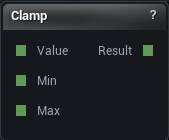
The Clamp node
When to use it
Holds a value between a minimum and a maximum.
Its job is making a computed setting safe before it drives a mesh node. A triangle budget derived from a measurement can legitimately come out at zero or at ten million, and clamping is how the graph stays inside the range you tested.
A node that clamps internally gives you no signal that the value was out of range. This one keeps the intent on the canvas where you can see it.
Set Min above Max and it publishes nothing and says so, rather than handing back Max for every input.
Pins
| Pin | Type | Description |
|---|---|---|
Value |
Number | The number to keep in range. Leave it unwired and the panel value is used. |
Min |
Number | The floor. Leave it unwired and the panel value is used. |
Max |
Number | The ceiling. Leave it unwired and the panel value is used. |
| Pin | Type | Description |
|---|---|---|
Result |
Number | The number, pulled back inside Min and Max. |
Settings
| Setting | Type | Description |
|---|---|---|
Value |
Number | The number to keep in range. The Value pin overrides it. |
Min |
Number | The floor. Set it above Max and the node goes red instead of guessing. |
Max |
Number | The ceiling. |
Available in Mesh Morpher Graph and Mesh Morpher Studio.