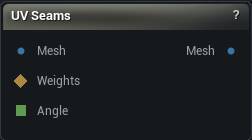
The UV Seams node
When to use it
Edits UV seams - where the atlas is allowed to be cut - and re-solves only the islands that changed.
Generate UVs decides both the seams and the unwrap in one shot, and the only way to disagree with it today is to run it again with different settings and lose the whole layout. This node is the local alternative: cut or weld a seam where the result is wrong, re-unwrap the handful of islands that were touched, and leave every other island exactly where it is (see Preserve Island Bounds).
How to use it
- 1
Connect a mesh that already has UVs
- 2
Pick a mode; the selection modes need Weights connected
- 3
Leave Re-unwrap on Conformal unless you have a reason not to
- 4
Click Apply, then Pack UVs if the layout needs re-laying-out
Pins
| Pin | Type | Description |
|---|---|---|
Mesh |
Mesh | The mesh to edit. It needs UVs in the chosen channel already. |
Weights |
Weight Map | The region to work on. The two selection modes will not run without it. |
Angle |
Number | Angle Threshold in degrees, taken from the graph. Only read in Add Seams By Angle mode. |
| Pin | Type | Description |
|---|---|---|
Mesh |
Mesh | The mesh with the chosen channel's seams edited and the affected islands unwrapped again. The other channels come out untouched. |
Settings
| Setting | Type | Description |
|---|---|---|
UV Channel |
Whole number | Which UV channel to edit. The others come out untouched. |
Seam Mode |
Choice | Cut new seams, carve a selection into its own island, or weld seams shut. |
Angle Threshold |
Number | How sharply the two faces of an edge have to meet before it becomes a seam. 60 catches hard corners. 30 also catches soft creases, and leaves you with a lot more islands to pack. |
Unwrap Method |
Choice | How the affected islands get their UVs worked out again after the edit. |
Preserve Island Bounds |
True/False | Drops each re-unwrapped island back into the space it already occupied, at its old aspect ratio. This is what keeps the edit local. A fresh unwrap comes back at some arbitrary size and position, so with this off the re-solved islands land on top of the rest of the atlas and you have to repack everything. Turn it off only when Pack UVs is next in the chain anyway. |
Selection Threshold |
Number | A vertex counts as selected once its weight reaches this. The two selection modes need it. In Add Seams By Angle it only limits the search to edges inside the selection, and searches the whole mesh when nothing is wired. |
Available in Mesh Morpher Graph and Mesh Morpher Studio.