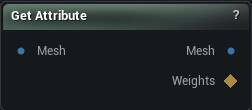
The Get Attribute node
When to use it
The read-it-back half of "store a number on each vertex". Set Attribute, a Wrangle, or an importer put a named value on the mesh; this node pulls one component of it out as an ordinary per-vertex weight map.
That is the currency roughly a dozen nodes already accept - masks, blends, weight-map math, brush gates - which is why the output is a weight map rather than some new attribute pin type nothing downstream could eat.
Use it whenever data that arrived with a mesh has to start driving something. Use Transfer Attribute instead when the data has to move to a different mesh, and Change Attribute Domain when it has to move between vertices and triangles.
Attribute is a dropdown listing what the connected mesh actually carries, so there is nothing to remember and nothing to misspell. If a name is not offered, the mesh does not have it - wiring the node to the wrong upstream mesh is by far the most common cause.
Pins
| Pin | Type | Description |
|---|---|---|
Mesh |
Mesh | The mesh that is carrying the stored value. |
| Pin | Type | Description |
|---|---|---|
Mesh |
Mesh | The input mesh, unchanged. |
Weights |
Weight Map | The chosen component, one number per vertex. |
Settings
| Setting | Type | Description |
|---|---|---|
Attribute |
Text | Which stored value to read. The dropdown lists what the incoming mesh carries, and its search box doubles as a text field while nothing is connected. Ask for a name the mesh does not have and the error tells you which names it does have, which is what you want when you have misspelled one. |
Component |
Whole number | Which component to read out. 0 is X. Clamped to however many the stored value actually has. |
Combine Triangles By |
Choice | How triangle values collapse onto vertices. Only used when the value is stored per triangle; ignored otherwise. |
Available in Mesh Morpher Graph and Mesh Morpher Studio.