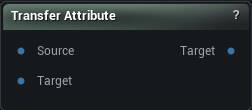
The Transfer Attribute node
When to use it
The move-it-between-meshes step of the attribute model: a named value that lives on the source mesh is copied onto the mesh flowing through. The Attribute dropdown reads the source, because the source is where the value has to exist.
There are two completely different correspondences here, they produce different numbers, and the node tells you which one it used every time.
- By index - element i of the source becomes element i of the target. Exact, free, and correct only when the two meshes share topology. It requires equal element counts and refuses outright when they differ, rather than transferring the overlapping prefix, because a partial transfer reads as a successful one.
- Nearest point - each target element samples the spatially closest source element. Works across any two meshes and is approximate by construction.
Mode is the setting people get wrong. Auto picks index when the counts match and nearest point otherwise, and that is a convenience, not a correctness claim - two unrelated 5000-vertex heads also have matching counts and will be copied index-for-index into nonsense. Force the mode whenever the answer matters.
Pins
| Pin | Type | Description |
|---|---|---|
Mesh |
Mesh | The mesh that already carries the value. |
Target |
Mesh | The mesh that receives it. It can be built completely differently. |
| Pin | Type | Description |
|---|---|---|
Target |
Mesh | The receiving mesh, now carrying the copied value. |
Settings
| Setting | Type | Description |
|---|---|---|
Attribute |
Text | Which stored value to copy. It is created on the target with the same shape it had on the source. The dropdown lists what the source carries, and its search box doubles as a text field while nothing is connected. |
Mode |
Choice | How the two meshes get matched up. Auto guesses from the vertex counts, which is convenient rather than reliable: two unrelated 5000-vertex heads also have matching counts. Set it yourself when the answer matters. |
Sampling |
Choice | How a nearest-point sample turns the source surface into one value: the closest value unchanged, or a blend across the triangle it landed on. By index copies element to element and ignores this, and so do whole-number and per-triangle attributes, where a blend has no meaning - the node says so when that happens. |
Max Distance (0 = no limit) |
Number | How far a target vertex or triangle may reach for a value, in mesh units. 0 means no limit. Anything with no source surface in range keeps zero, and the node message says how many those were. |
Available in Mesh Morpher Graph and Mesh Morpher Studio.