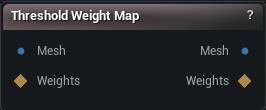
The Threshold Weight Map node
When to use it
Turns a weight map into a hard 1 or 0. Everything that passes the test comes out at 1, everything else at 0.
How to use it
- 1
Connect a mesh and a weight map
- 2
Set the threshold and comparison mode
- 3
The output updates as soon as either changes
Pins
| Pin | Type | Description |
|---|---|---|
Mesh |
Mesh | The mesh the weight map belongs to. |
WeightMap |
Weight Map | The soft weight map to cut up. |
| Pin | Type | Description |
|---|---|---|
Mesh |
Mesh | The input mesh, unchanged. |
Weights |
Weight Map | 1 on every vertex that passed the test, 0 everywhere else. |
Settings
| Setting | Type | Description |
|---|---|---|
Threshold |
Number | The value every vertex is measured against. |
Selection Mode |
Choice | Which side of the threshold passes. |
Tolerance |
Number | How far either side of the threshold still counts as equal. It starts almost at zero, so on a smooth gradient nothing passes until you widen it. |
Available in Mesh Morpher Graph and Mesh Morpher Studio.