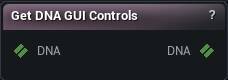
The Get DNA GUI Controls node
When to use it
Lists every GUI control (slider) a DNA exposes and, for the one you pick, evaluates exactly what a chosen value on it drives - which raw controls, and at what values - computed the same way RigLogic's own conditional table would compute it.
How to use it
- 1
Wire a DNA in
- 2
Pick a control from the dropdown (lists every one, in DNA order, regardless of the pick)
- 3
Set Control Value and read Inspection (in the details panel) to see exactly what that control drives and how far
Pins
| Pin | Type | Description |
|---|---|---|
DNA |
DNA | The DNA to read. Passes straight through to the output, untouched. |
| Pin | Type | Description |
|---|---|---|
DNA |
DNA | The same DNA, byte for byte. Never written by this node. |
Settings
| Setting | Type | Description |
|---|---|---|
Control Name |
Text | Which GUI control to evaluate. The list comes from the DNA on the input pin - wire that first or the dropdown is empty. |
Control Value |
Number | The value to drive ControlName at, in that control's own units - a slider's own from/to domain, which RigLogic never normalizes to a fixed range. A value outside the control's legal range matches nothing and evaluates to 0 - that is RigLogic's own behavior, not a bug here, so this deliberately carries no ClampMin/ClampMax. |
Learn more
| Modify MetaHuman RBF poses | Read the walkthrough on meshmorpher.com | https://meshmorpher.com/blog/modify-metahuman-rbf-poses |
| Modify DNA bone expressions | Read the walkthrough on meshmorpher.com | https://meshmorpher.com/blog/modify-meta-human-dna-bone-expressions-with-mesh-morpher |
| Custom DNA topology | Read the walkthrough on meshmorpher.com | https://meshmorpher.com/blog/custom-dna-topology-with-mesh-morpher-graph |
Available in Mesh Morpher Graph and Mesh Morpher Studio.