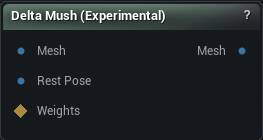
The Delta Mush (Experimental) node
When to use it
Smooths a deformed mesh while keeping its original surface detail. The usual job is fixing the crumpling and volume loss that linear skinning leaves at elbows, shoulders and knees.
It needs both poses: the deformed mesh on Mesh and the same mesh at rest on RestPose. The smoothing happens on the deformed shape, and the detail is read back off the rest pose, which is why the two must share vertex count and order.
Connect a WeightMap to make the correction local. Each vertex's result is blended between its original deformed position and the Delta Mush result by that weight, so you can keep the fix on the joints and off the face.
For a whole animation rather than one pose, Delta Mush Animation bakes the same correction into morph targets the sequence drives.
How to use it
- 1
Connect the rest pose and the deformed mesh
- 2
Configure the smoothing and detail settings
- 3
Optionally connect a WeightMap for per-vertex masking
- 4
Click Apply to smooth the mesh
Pins
| Pin | Type | Description |
|---|---|---|
Mesh |
Mesh | The posed mesh, with whatever pinching and collapse the skinning left behind. |
RestPose |
Mesh | The same mesh in its rest pose. The surface detail is read from here, so the vertex count and order must match. |
WeightMap |
Weight Map | Optional mask. Scales the correction, so you can keep it on the elbows and off the face. |
| Pin | Type | Description |
|---|---|---|
Mesh |
Mesh | The posed mesh with the smoothing applied. |
Settings
| Setting | Type | Description |
|---|---|---|
Smoothing: Iterations |
Whole number | How many smoothing passes run over the mesh. More passes clean up worse collapsing, at the cost of time, and thin shapes start to shrink unless Edge Preservation is up. |
Weight Type |
Choice | How a vertex is weighted against its neighbours while smoothing. Inverse Distance: safest around fingers, joints and anything thin. Avoids the pinching Cotangent can cause. Cotangent: the usual pick for smooth organic surfaces with tidy triangles. Mean Value: holds together on meshes with badly shaped triangles. Uniform: every neighbour counts the same. Fast, but blind to the shape of the surface. |
| Setting | Type | Description |
|---|---|---|
Amount |
Number | How much of the original surface detail comes back once the smoothing is done. At 0 you keep the smoothed blob. At 1 the pores, folds and seams return in full. |
Frame Smoothing |
Whole number | Smoothing passes over the local frame each detail offset rides on. Raise it when the restored detail shimmers or jitters as the pose moves. 0 turns it off. |
| Setting | Type | Description |
|---|---|---|
Inward |
Number | How far vertices may move inward, toward the middle of the mesh. Pull it down when armpits and the backs of knees cave in on themselves. 0 blocks inward motion outright. |
Outward |
Number | How far vertices may move outward, away from the middle of the mesh. Pull it down when the smoothing starts inflating shoulders and knuckles. 0 blocks outward motion outright. |
| Setting | Type | Description |
|---|---|---|
Edge Preservation |
Number | Limits how far a vertex can slide in toward the middle of its neighbours, which is what stops fingers, horns and antennae shrivelling into sticks. At 0 edges are free to shorten; at 1 they keep their length. Once you run past 100 iterations, 0.3 to 0.7 is the useful range. |
| Setting | Type | Description |
|---|---|---|
Skin Sliding: Iterations |
Whole number | Passes that stop the restored detail creeping across the surface as the pose changes, which reads on screen as the texture sliding over the skin. 0 turns it off. |
Stiffness |
Number | Trades detail against sliding correction. 0 corrects the most and softens fine detail. 1 keeps every last detail and corrects nothing. |
| Setting | Type | Description |
|---|---|---|
Strain Falloff: Iterations |
Whole number | Spreads the effect outward from the parts that actually deformed, so it fades away instead of stopping at a visible line across the limb. 0 leaves that line. |
Decay |
Number | How fast that spread runs out. Low values keep the effect tight around the joint, high values carry it further down the limb. |
| Setting | Type | Description |
|---|---|---|
Angle Threshold |
Number | Surfaces twisted further than this from their rest orientation get an extra round of smoothing. Aimed at the hard cases, like a wrist rolled almost the whole way over. |
Extreme Rotation: Iterations |
Whole number | Extra smoothing passes, applied only to those heavily twisted areas. |
| Setting | Type | Description |
|---|---|---|
Preserve Boundaries |
True/False | Ease off the smoothing along open edges so the mesh does not creep back from its border. Worth turning on for a cut-out piece like a shirt or a face patch. |
Weight |
Number | How firmly those open edges are held. 0 smooths them like anywhere else, 1 pins them in place. |
Learn more
| Delta Mush in Mesh Morpher Graph | Read the walkthrough on meshmorpher.com | https://meshmorpher.com/blog/delta-mush-in-mesh-morpher-graph |
Available in Mesh Morpher Graph and Mesh Morpher Studio.