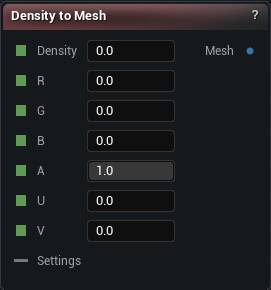
The Density To Mesh node
When to use it
Where a voxel graph stops being maths and becomes a mesh. Wire your field into Density, hang a Generate Settings node off Settings, press Generate Mesh. R/G/B/A and U/V are optional; wire them and the result carries vertex colours and UVs.
Pins
| Pin | Type | Description |
|---|---|---|
Density |
Number | The shape, as a field. Negative means inside, positive means outside, and the skin sits where it crosses zero. |
R |
Number | Red for the vertex colour, 0 to 1. Optional. |
G |
Number | Green for the vertex colour, 0 to 1. Optional. |
B |
Number | Blue for the vertex colour, 0 to 1. Optional. |
A |
Number | Alpha for the vertex colour, 0 to 1. Leave it alone and everything is opaque. |
U |
Number | U for the UVs. Optional. |
V |
Number | V for the UVs. Optional. |
Settings |
Voxel Settings | Wants a Generate Settings node. It decides blocky or smooth, how fine the voxels are and how much of the field gets built. Share one settings node with Voxel Sculpt and what you sculpted is what you bake. Collision and raytracing settings do nothing here. |
| Pin | Type | Description |
|---|---|---|
Mesh |
Mesh | The finished mesh, carrying colour and UVs if you wired those inputs. Goes into any mesh node from here. |
Settings
| Setting | Type | Description |
|---|---|---|
Material Section Name |
Text | What the mesh's one material slot gets called. Worth setting, or it shows up as "Section 0" everywhere you look at it later. Renaming it does not rebuild anything. |
Available in Mesh Morpher Graph and Mesh Morpher Studio.