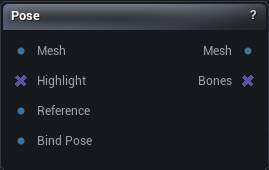
The Pose node
When to use it
Opens a viewport for posing the skeleton by hand and outputs the deformed mesh. Select the node to get the gizmos; deselect it and they go away.
Use it to check a rig at extreme angles before shipping it, to build the corrected pose Set DNA Expression or Set DNA RBF Pose will record, or simply to pose a character for a render.
How to use it
- 1
Connect a skeletal mesh
- 2
Pose the skeleton in the viewport
- 3
The output is the posed mesh
Pins
| Pin | Type | Description |
|---|---|---|
Mesh |
Mesh | The rigged mesh to pose. Its skeleton is what you grab in the viewport. |
Highlight |
Bone Selection | Bones to have picked already when the tool opens. |
Reference |
Mesh | Optional second mesh drawn alongside, to pose against. |
Bind Pose |
Mesh | Optional: the same mesh at its bind or neutral pose. Wire it only if you want the skinning solved from the T-pose while the gizmos start on an already-posed Mesh. Leave it unwired to treat Mesh as the rest pose - Get DNA RBF Pose's Mesh is already a matching vertices-and-bones pair. |
| Pin | Type | Description |
|---|---|---|
Mesh |
Mesh | The mesh in its new pose, skeleton and all. |
Bones |
Bone Selection | The bones you had selected, plus their mirror partners when mirroring was on. |
Learn more
| Morph full body MetaHumans and skeletons | Read the walkthrough on meshmorpher.com | https://meshmorpher.com/blog/morph-full-body-meta-humans-and-skeletons |
Available in Mesh Morpher Graph and Mesh Morpher Studio.