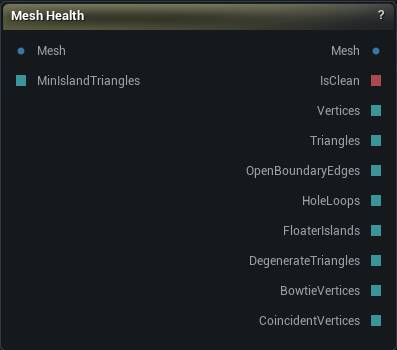
The Mesh Health node
When to use it
Inspects the incoming mesh for the flaws that make sculpting and deformation tools misbehave, passes the mesh straight through, and publishes what it found on pins. Findings are ranked by severity and written in plain language, and each one has a repair button next to it.
Drop one in wherever you suspect the input rather than the operation: before a boolean that keeps failing, after an import, either side of a Weld to see how many boundary edges actually went away. Branch a batch graph on Is Clean to stop a bad mesh reaching an export.
Until you press a repair button it is a pass-through, so it re-checks on its own whenever the mesh upstream changes. Press one and the output becomes a computed result like any other node's: an upstream edit then marks it stale and waits for you to re-run it.
How to use it
- 1
Drop it anywhere in a mesh chain
Mesh in, mesh out, nothing changes.
- 2
Read the findings in the details panel
- 3
Press a repair button for what can be fixed
Remove Floaters, Weld, Remove Degenerate, Split Pinch Points and Fill Holes. Each is one undo step, and each publishes the repaired mesh downstream.
Pins
| Pin | Type | Description |
|---|---|---|
Mesh |
Mesh | The mesh to inspect. Passes straight through to the Mesh output unless you press a repair button. |
MinIslandTriangles |
Whole Number | Islands with fewer triangles than this count as floaters. Leave it unconnected to use the value in the details panel. |
| Pin | Type | Description |
|---|---|---|
Mesh |
Mesh | The input mesh, unchanged, or the repaired mesh once you have pressed a repair button. |
IsClean |
True/False | True when the mesh has no invalid positions, no open edges, no floaters, no degenerate triangles and no pinch points. Blank at the fast scan depth, which skips two of those checks. |
Vertices |
Whole Number | Vertex count of the analysed mesh. |
Triangles |
Whole Number | Triangle count of the analysed mesh. |
OpenBoundaryEdges |
Whole Number | Edges with only one triangle attached. Non-zero means the surface is open. |
HoleLoops |
Whole Number | Number of distinct boundary loops (holes) in the surface. A lower bound when pinch points interrupt the walk. |
FloaterIslands |
Whole Number | Disconnected islands smaller than Min Island Triangles. |
DegenerateTriangles |
Whole Number | Triangles with effectively zero area. Empty (no value) when the scan depth is Boundary + Islands. |
BowtieVertices |
Whole Number | Vertices where two surface fans meet at a single point. Empty (no value) when the scan depth is Boundary + Islands. |
CoincidentVertices |
Whole Number | Vertices sitting on top of another vertex. Empty (no value) when the check did not run - it is skipped on very large meshes. |
Settings
| Setting | Type | Description |
|---|---|---|
Analyze Automatically |
True/False | Re-check the mesh every time it changes upstream. Turn it off on a mesh dense enough that the scan gets in your way; the node then shows nothing until you press Analyze, rather than numbers describing an older mesh. |
Scan Depth |
Choice | Which checks to run. |
Min Island Triangles |
Whole number | Islands with fewer triangles than this count as floaters, both in the report and for the Remove Floaters button, so the button deletes what the report named. The one exception is the largest surface, which the repair always keeps even when it is itself under the threshold - otherwise "remove everything under 1000 triangles" would empty a model made entirely of small pieces. Set the threshold above every island and the report counts them all while the button removes all but the biggest. |
Max Auto Analyze Vertices |
Whole number | Automatic checking is skipped above this vertex count; the Analyze button still works. 0 removes the ceiling. |
Measure Symmetry |
True/False | Also measure how far the mesh is from mirroring itself. Off by default: on a dense mesh this one check costs more than all the others together. |
Symmetry Axis |
Choice | Which plane the symmetry measurement mirrors about. |
Symmetry Plane Origin |
Choice | Which point that plane passes through. Mesh Centre is the sculpt / Fix Symmetry default, so a scan imported off-origin still measures about itself. World Origin is what you need when a one-sided crop has dragged the bounds centre off the real plane. |
Symmetry Plane Offset |
Vector | Nudges the plane off that point, in cm. Only the component along the symmetry axis does anything; the other two just slide the plane around inside itself. |
Weld Tolerance Fraction |
Number | How close two vertices have to be before Weld merges them, as a fraction of the bounds diagonal, so one number works on a 1 cm prop and a 200 cm character. |
Max Hole Edges |
Whole number | Fill Holes leaves boundary loops longer than this alone. |
Available in Mesh Morpher Graph and Mesh Morpher Studio.