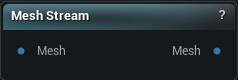
The Mesh Stream node
When to use it
Hands the mesh on the input off to another application over a local connection, Blender being the intended partner, so you can sculpt or model on it there and see the result update live in the preview here as you work. Press Start Stream to send it out; nothing round-trips back to the Mesh output until you press Stop Stream, which is also the point where whatever the other application sent back gets written there.
Good for iteration, not for anything you mean to keep, because a stream has no file behind it. Load File Mesh for that.
Subject Name has to match exactly what the other application connects under. Get it wrong and there is no error and no geometry, just a node that never updates. Check the name, and check the stream was actually started, before you go looking at the graph.
How to use it
- 1
Set Subject Name to match the other application
- 2
Press Start Stream to send the mesh out
- 3
Model there; the preview here follows along live
- 4
Press Stop Stream to write the result to the Mesh output
Pins
| Pin | Type | Description |
|---|---|---|
Mesh |
Mesh | The mesh to send out, under the Subject Name you set below. |
| Pin | Type | Description |
|---|---|---|
Mesh |
Mesh | Whatever the other application sent back. It only updates when you stop the stream. |
Settings
| Setting | Type | Description |
|---|---|---|
Subject Name |
Text | The name the other application connects to. It has to match on both ends, and changing it mid-stream does nothing until you stop and start again. |
Learn more
| Mesh syncing with Mesh Stream | Read the walkthrough on meshmorpher.com | https://meshmorpher.com/blog/mesh-syncing-with-mesh-stream |
Available in Mesh Morpher Graph and Mesh Morpher Studio.