Meta Humans
How to Edit MetaHuman DNA PSDs to Fix a Mix of Expressions
By Admin ·
Every expression in a MetaHuman DNA is authored on its own. CTRL_expressions.jawOpen looks right by itself, CTRL_expressions.mouthSmile looks right by itself, and RigLogic adds them together when both are up. That sum is where faces fall apart: two shapes that were each correct in isolation stack into a mouth that stretches too far, a lip that clips through teeth, a cheek that folds the wrong way. What you need is a shape that only exists when both controls are active - and the mechanism in a DNA for "only when both are active" is a PSD. This video edits the PSD table to set that condition, then sculpts the corrective shape by hand and writes it back into the rig. It runs in Mesh Morpher Graph inside Unreal Engine; every node here exists in Mesh Morpher Studio too.
What we need
- Mesh Morpher Graph inside the Unreal Editor, or Mesh Morpher Studio on its own
- A MetaHuman head DNA - read out of the face skeletal mesh in Graph, or from a .dna file in Studio
- A pair (or more) of expressions that look fine alone and wrong together. That combination is the whole brief
What a PSD actually is
A PSD is a control the rig computes rather than one you animate. Its value is the weighted product of its factors, and each factor is one other control with a weight. Because it is a product, the PSD sits at zero while any one of its factors is at zero, and only climbs when all of them are up at once. That is exactly the behaviour a combination corrective needs: invisible for either expression on its own, present for the mix.
The node's own footer says it plainly: "A PSD is the weighted product of its own factors - order does not matter, but each control may drive at most one factor here." Order does not matter because multiplication does not care. One factor per control matters because listing the same control twice would square its contribution instead of weighting it.
Add the PSD
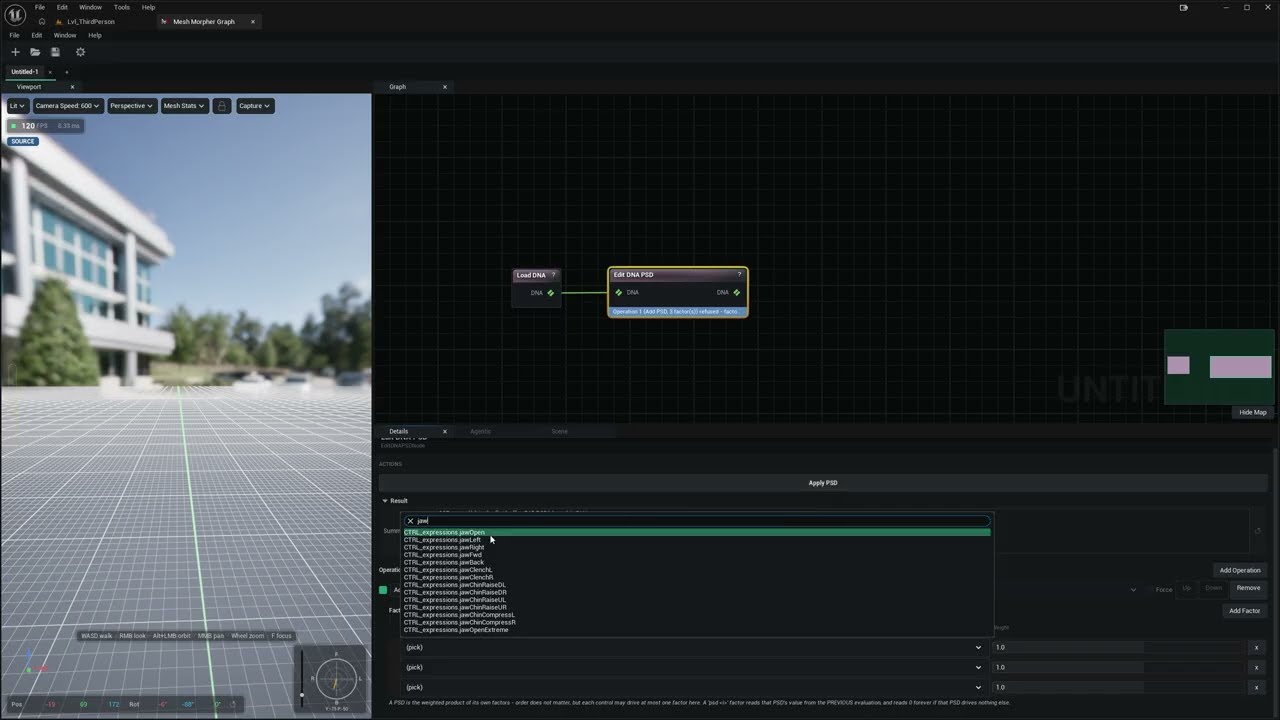
Start with Load DNA pointed at the face skeletal mesh - in Studio, Load DNA File pointed at the file - then wire it into Edit DNA PSD.
The node takes an ordered list of operations, each one Add, Replace Factors or Remove. For a new combination corrective you want one Add entry with a Factors table under it: one row per control in the mix, each with its own weight. The control picker is searchable, which matters when you are hunting for one jaw control among a few hundred - type jaw and it narrows to jawOpen, jawLeft, jawRight, jawFwd and the rest of the family. Press Apply PSD.
A factor does not have to be a plain expression control, either. The picker also offers a PSD's own output, an ML control or an RBF pose control, so a corrective can be conditioned on something the rig already computes rather than only on raw slider values.
The batch is atomic. Every enabled entry runs in order against the result of the one before it, and the first refusal publishes nothing at all - not even the operations that already succeeded. A rejected entry reports itself on the node, so a PSD whose factors do not add up never half-lands in the file.
The channel the PSD drives
A PSD on its own only produces a number; a blend shape channel is what turns that number into geometry. A MetaHuman head DNA already ships with a large set of PSD-driven corrective channels, which is why the video is about editing the PSD table rather than inventing a rig from nothing - the machinery is there, and what you are changing is the condition and the shape.
Edit DNA Blendshape Channel is the node for the channel side of that, and it works exactly like the PSD node - an ordered, atomic list, with operations for Add, Rename, Set Lods, Wire Expression, Remove Channel and Remove Target, and an Apply Blendshape Channel button. Use it to give a channel LOD membership, rename one, or drop a target row that came out wrong.
One limit is worth knowing before you plan a rig around it: Wire Expression resolves its Control Name against the DNA's raw controls only, and refuses anything else with "is not a raw control on this DNA". A PSD is not a raw control, so pointing a brand-new channel at a brand-new PSD is not something that operation will do. For that whole chain in one step - the PSD, the channel, the behaviour row and the targets together - the Wrangle Python stage has add_corrective_blendshape(name, expressions, mesh_targets), where expressions is the two or more controls whose combination drives it.
Pose the mix, then sculpt the fix
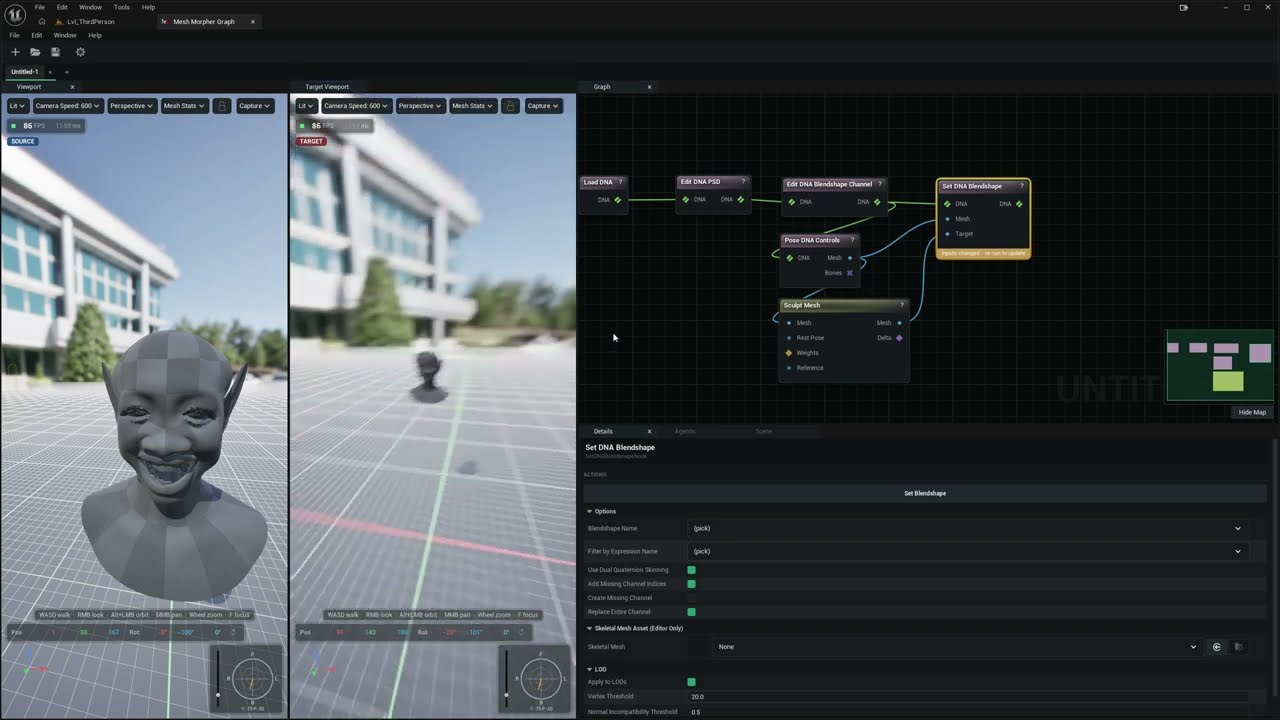
Wire the DNA into Pose DNA Controls and push up the sliders for the expressions that fight each other. The node evaluates the DNA through its own RigLogic rig - GUI-to-raw mapping, correctives, machine-learned behaviour, joints, blendshapes and animated maps - so what you see is the broken result the character will actually show, not an approximation. Sliders repose on release rather than on drag, so dialling in a pose stays responsive.
Feed that posed mesh into Sculpt Mesh and fix the face by hand: pull the lip back off the teeth, take the stretch out of the mouth corner, settle the cheek. You are sculpting on top of the pose, which is the right place to work - you can see the error you are correcting.
Write the shape into the DNA
Set DNA Blendshape takes two meshes and stores the difference between them. Put the posed mesh on Mesh and your sculpted copy of it on Target, pick the channel, and press Set Blendshape. What lands in the DNA is the delta - exactly what a corrective is, a small offset added on top of whatever the rig already computed, rather than a whole replacement face.
The two meshes must share vertex count and order, and both must match the DNA's own mesh at that LOD. Sculpt on a copy of the mesh the graph handed you and do not retopologise it. Apply to LODs projects the shape onto every coarser LOD so the correction does not pop off as the character walks away from camera, with a Vertex Threshold capping how far that projection may reach for a matching vertex and a Normal Incompatibility Threshold refusing a match whose triangle faces too far the other way.
Two options decide what happens when the channel name is new rather than existing. Add Missing Channel Indices lets the write create the channel on parts of the mesh that do not carry one yet; turn it off and those parts are skipped. Create Missing Channel, off by default, adds the channel itself instead of doing nothing - and the node is explicit that such a channel "gets your sculpted shape but no expression driving it yet", so it sits inert until something is wired to it.
Check it, then hand it back
The fastest check is the node you already have: reposing the same mix through Pose DNA Controls now runs the corrective too, because that node evaluates corrective behaviour along with everything else. If the mouth reads correctly at the mix and both expressions still look right on their own, the PSD is doing its job.
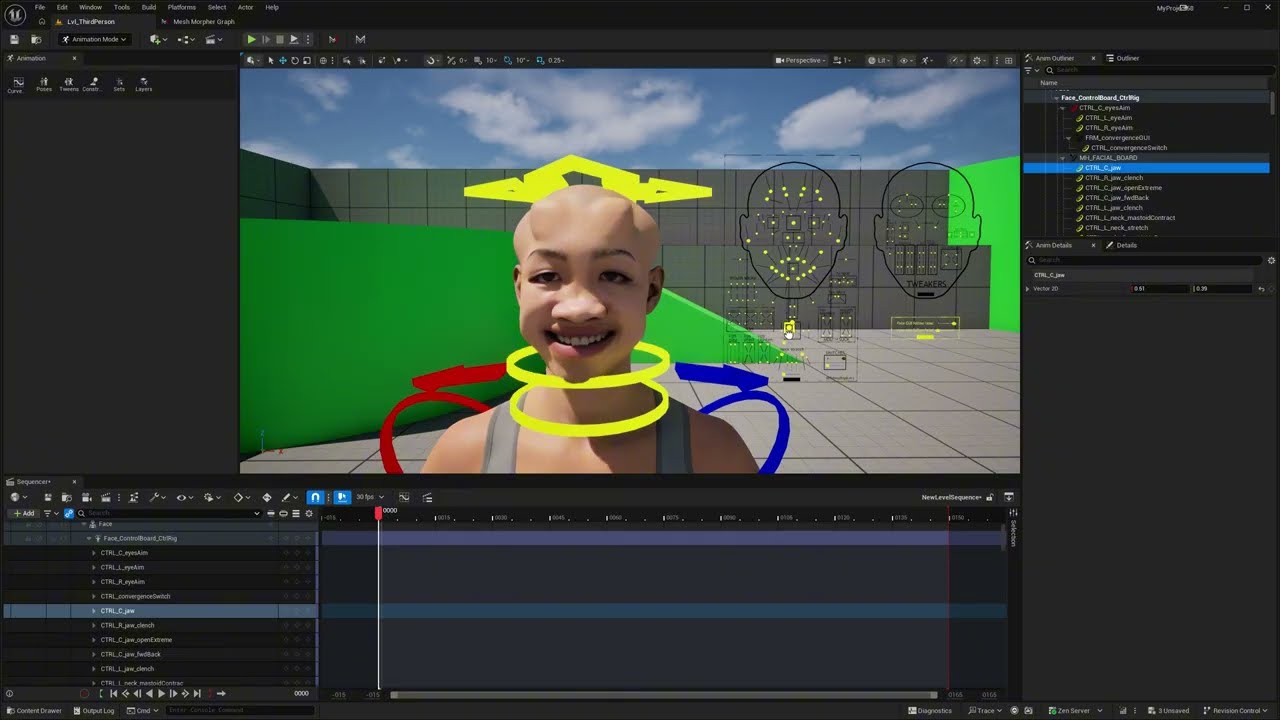
Run Validate DNA before you commit, then write the result where it belongs. In Graph that is Set DNA On Skeletal Mesh, which replaces the DNA on the face asset - editor only, since it edits a project asset. In Studio, write a .dna file with Write DNA instead. Either way the corrective is part of the rig from then on, and it fires from the face board in Sequencer with no extra setup.
Worth knowing
- One factor per control. The PSD is a product, so a control listed twice would be squared. Weight it once instead.
- A PSD is invisible until every factor is up. That is the point, and it is also the first thing to check if a corrective seems dead - one factor still at zero holds the whole product at zero.
- Both edit nodes are all-or-nothing. A refused operation publishes no part of its batch, which is what keeps a DNA from ending up half-edited.
- Removing a PSD renumbers the ones after it. Add appends to the end of the PSD band; Remove deletes an index and shifts every later PSD down by one. Replace Factors is a remove followed by an add, so the replacement lands on a new index rather than reclaiming the old one. Worth knowing if you keep indices written down anywhere.
- Correctives are deltas, not faces. Sculpt only what is wrong. The rest of the pose is already coming from the rig.
- Wire Expression takes raw controls, not PSDs. For a corrective driven by a brand-new PSD, build the chain with the Wrangle stage's
add_corrective_blendshaperather than by hand. - It works in both products. Edit DNA PSD, Edit DNA Blendshape Channel, Pose DNA Controls, Sculpt Mesh and Set DNA Blendshape all run in Studio as well as in Graph. Only reading and writing engine assets is editor-only.
The full node reference for these lives in the MetaHuman DNA section of the documentation, pin by pin and setting by setting.
#metahuman#dna#psd#correctives#blendshapes#graph#studio#tutorial#unreal-engine
Related posts
- How to Create MetaHuman DNA Expressions from Scratch with Mesh Morpher Graph and Studio
- How to Merge MetaHuman Body and Head DNA with Mesh Morpher Graph and Studio
- How to Modify MetaHuman DNA RBF Poses with Mesh Morpher Classic
- How to Modify MetaHuman RBF Poses with Mesh Morpher Graph and Mesh Morpher Studio
Looking for reference material? Read the Mesh Morpher documentation or see pricing & licenses.