Meta Humans
Generate Random and Parametric MetaHuman Heads in Mesh Morpher Studio
By Admin ·
A MetaHuman normally starts with a face someone already made - the Creator's presets, a scan, a blend of existing heads. The GNM Head node starts with nothing. It builds a complete human head from a parametric model: ask for a random one, ask for a woman of a given ethnicity, or dial 170 named shape coefficients by hand. Then two more nodes rebuild a real MetaHuman head DNA on that face, so what comes out is not a sculpt you have to retopologise - it is a rig the face board can drive. The video does it in Mesh Morpher Studio; the same nodes run in Mesh Morpher Graph inside Unreal Engine.
What we need
- Mesh Morpher Studio, or Mesh Morpher Graph inside the Unreal Editor
- The GNM Head model pack, installed from Help > AI Model Packs. The node tells you if it is missing before it asks you for anything else
- Optionally a MetaHuman head DNA and its matching body DNA, if you want the result fitted to a body you already have
What GNM actually is
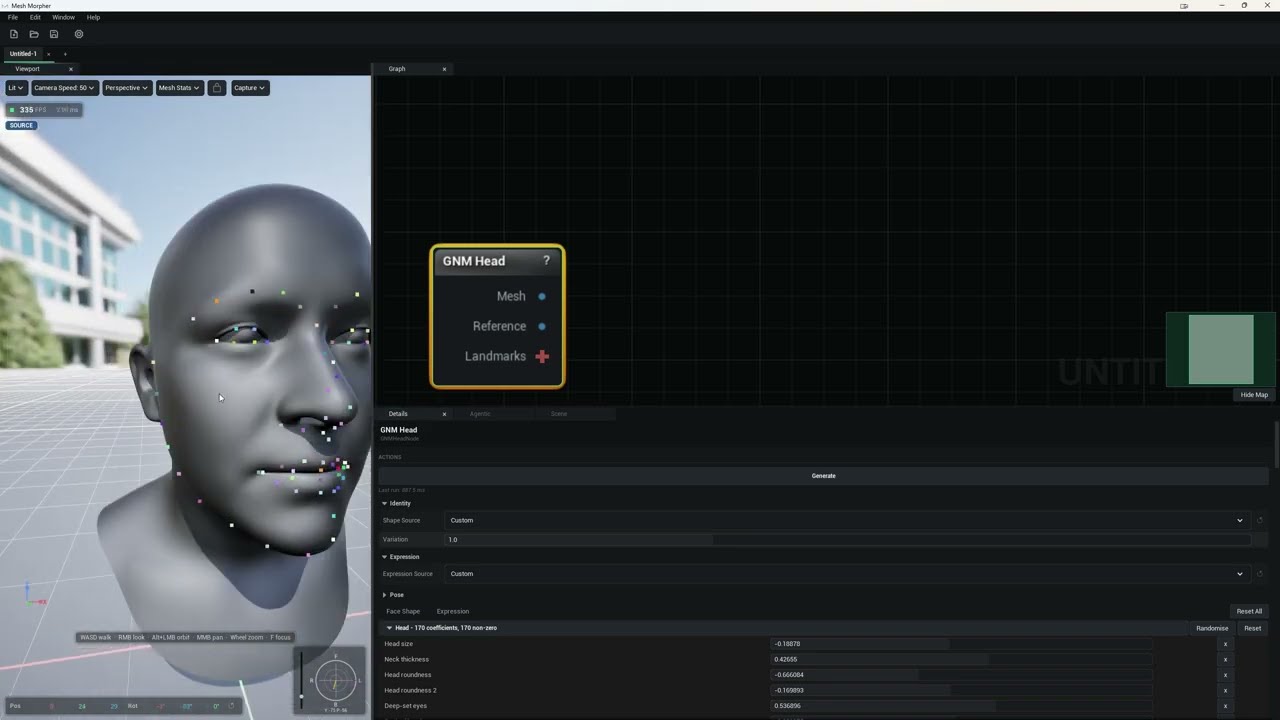
GNM is Google's parametric head model. Instead of vertices it stores a head as a list of coefficients, split into blocks: Head, Eyeballs and Teeth describe the identity - the face you were born with - while Left Eye, Right Eye, Lower Face, Tongue and Pupil describe the expression it is wearing. The Head block alone carries 170 coefficients.
What makes it usable rather than abstract is that the coefficients are named. They are not opaque weights: the board lists Head size, Neck thickness, Head roundness, Deep-set eyes and 166 more, each a slider. That is the difference between a generator you can only re-roll and one you can actually direct.
There is no preview step and no bake. The head evaluates in a few milliseconds, so changing a setting, releasing a slider or pressing Generate all re-evaluate and publish immediately.
Four ways to get a face
Shape Source decides where the identity comes from:
- Average - every identity coefficient at zero: the model's template head. The default, and the right starting point when you intend to dial the face yourself.
- Random - each coefficient is a standard normal draw from Shape Seed, scaled by Variation. This is the re-roll button.
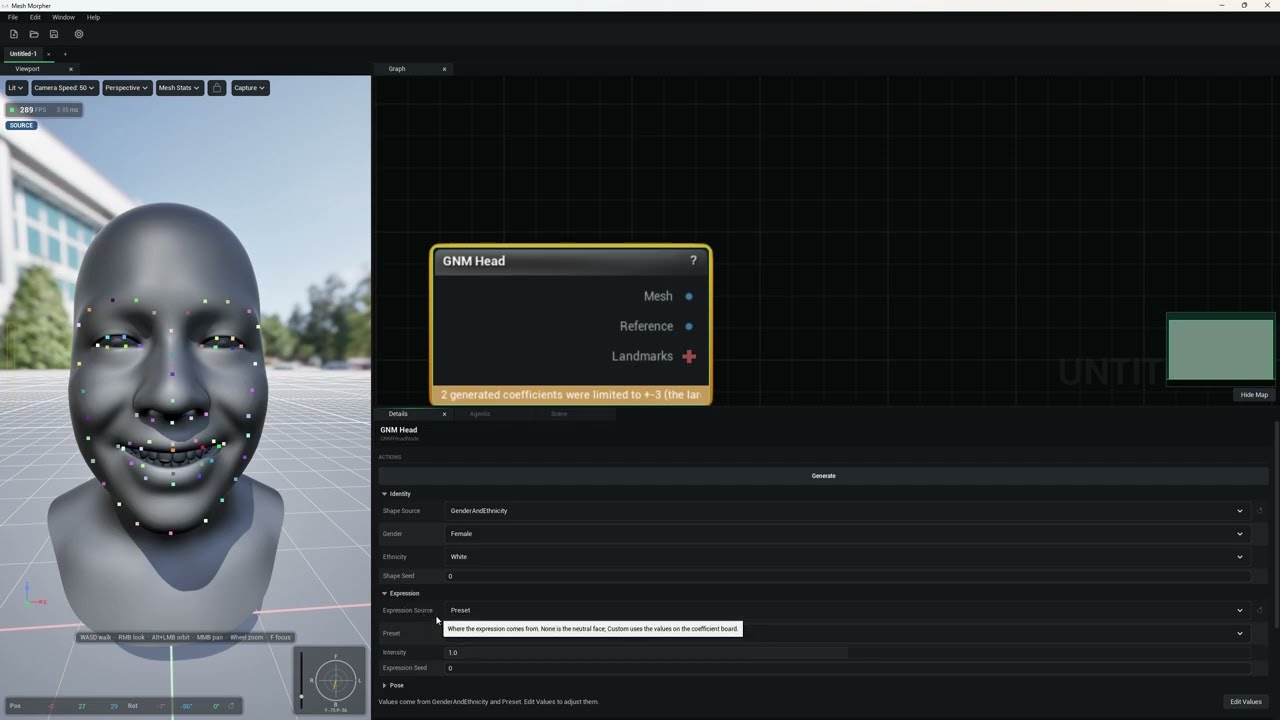
- Gender And Ethnicity - the semantic sampler, conditioned on Gender (Female or Male) and Ethnicity (Middle Eastern, Asian, White or Black), decoded from a seeded latent.
- Custom - the values on the coefficient board, and nothing else.
The seeds are what make this production-usable rather than a slot machine: the same seed and the same settings always give the same head, so a character you found by re-rolling is reproducible tomorrow. Variation controls how far a random face strays from the average, from 0 to 3, where 1 is the model's own spread.
The coefficient board
Whatever the sampler produced, Edit Values copies it onto the coefficient board and switches the source to Custom. From there every coefficient is a slider, grouped by block and split across a Face Shape tab and an Expression tab, with Randomise and Reset per group and Reset All for the lot.
This is the parametric half of the title, and the useful workflow is the combination of the two: re-roll until something is close, hit Edit Values, then fix the jaw and narrow the nose by hand instead of re-rolling and losing everything else you liked.
Expression, gaze and pose
Expression Source works the same way. None is the neutral face, Custom reads the board, and Preset decodes one of twenty expression classes from the sampler - Surprise, Disgust, Suck, Compress Face, Stretch Face, Happy, Squint, Platysma, Blow, Funneler, Smile Wide, Corners Down, Pucker, Wink Left, Wink Right, Mouth Left, Mouth Right, Lips Roll In, Snarl and Tongue Center. Intensity scales a preset, where 1 is the sampler's own strength and 0 is neutral, and Expression Seed makes the draw repeatable.
The Pose section, collapsed by default, adds Head Turn, Head Nod and Head Tilt in degrees, shared between the neck and the head joint, plus Gaze Turn and Gaze Up for the eyes. Worth knowing for reference shots: pose and gaze travel with Mesh but not with Reference.
The guard that keeps faces human
A sampler asked for an extreme face will happily return one with the teeth outside the lips. Two things stop that reaching you.
First, generated coefficients - from Random, Gender And Ethnicity or a Preset - are clamped to plus or minus 3 before the head is built, because the sampler sometimes returns values far outside its trained range; the eyeballs have been seen to reach 20. When that happens the node says so, in the form "2 generated coefficients were limited to +-3 (the largest was 7.4)." Values you set on the board are never clamped, on the principle that a number you typed is a decision.
Second, a plausibility guard tests the identity and the expression on every evaluation for teeth, tongue or eyes pushing through the lips or the skin, and for a pinched neck. Offending coefficients are softened, marked on the board and reported on the node. The mouth lining then fits the mouth sock around the teeth, toning down the lower face and tongue if it has to.
From a generated head to a real MetaHuman
GNM Head outputs three things: Mesh is the posed head, Reference is the same identity with no expression and no pose, and Landmarks carries the 68 iBUG face landmarks on Mesh.
Wire Reference into Apply GNM Identity To DNA. That node rebuilds a MetaHuman head DNA on the generated face: GNM's own face at its real metric size, on MetaHuman topology, at every LOD, with normals, skeleton, expression joint rows and blend shape correctives. The rig's structure stays the DNA's - you get a MetaHuman rig wearing a new face, not a new rig. Leave the DNA input empty to build on the MetaHuman head archetype, or wire your own head DNA to rebuild that one. Wire a matching Body DNA as well and the neck seam, its normals and skin weights, and the joints the head shares with the body all become the body's, which is what stops the head floating free of the shoulders. It rebuilds when an input changes, or on Apply.
If you also want the GNM expression itself in the rig, Generate DNA Expression From GNM writes it in as a new expression: face joints where they can follow it, and a LOD 0 blend shape for the rest. Its composition setting chooses between Joints And Blend Shape, which plays at every LOD and moves real bones including the teeth pivot, and Blend Shape Only, which follows GNM more exactly at half weights but does nothing below LOD 0. Press Generate Expression.
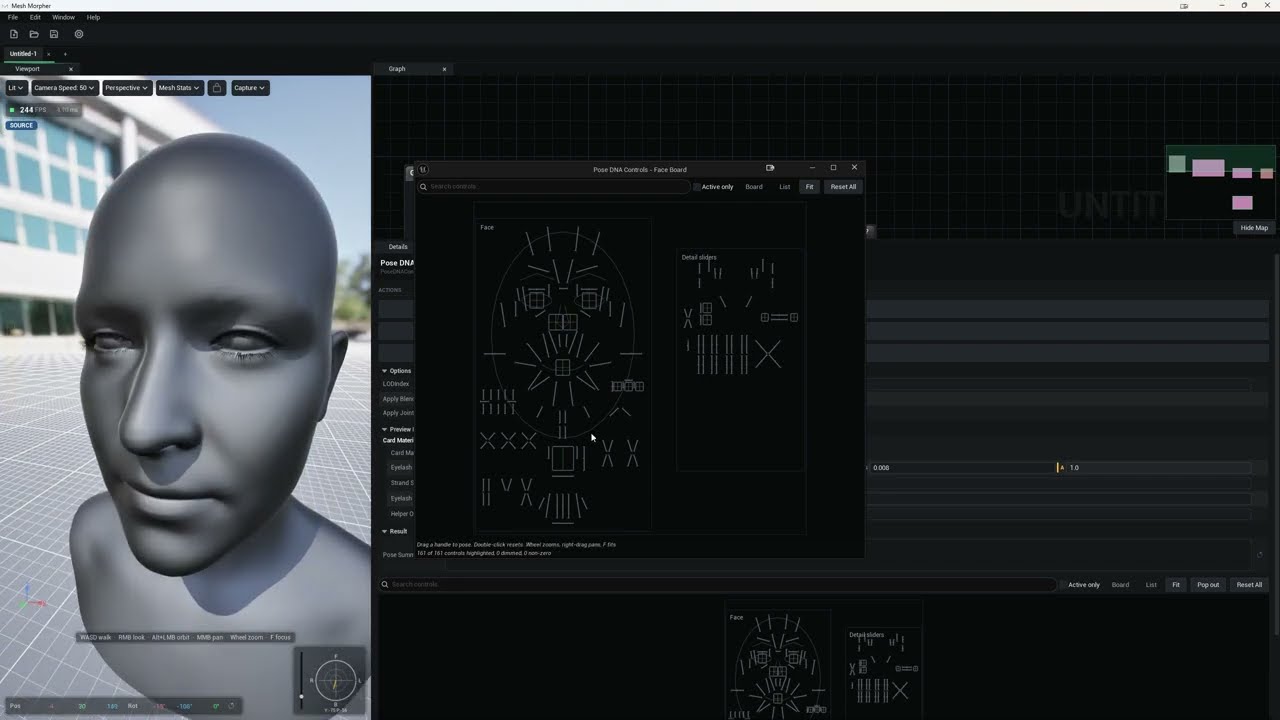
From there it is an ordinary MetaHuman DNA. Pose DNA Controls drives it from the real face board, Validate DNA checks it, and you either write it onto a face asset with Set DNA On Skeletal Mesh in Graph, or out to a .dna file with Write DNA in Studio.
Worth knowing
- Seeds make it repeatable. Note the seed next to a face you like. The same seed and settings rebuild it exactly, which matters more than it sounds when a director asks for "the third one again".
- Reference is the pin for the DNA chain. Feed Apply GNM Identity To DNA the un-posed, un-expressioned head. Mesh works too, but its expression is dropped on the way in, so you gain nothing by using it.
- Wire the body DNA if you have one. Without it the neck seam is the head DNA's own, and a head built for one body does not necessarily sit on another.
- The board beats the dice. Re-rolling throws away everything you liked along with the thing you did not. Edit Values first, then adjust.
- A clamp warning is information, not an error. It means the sampler overshot and the node pulled it back. The head is still built, and still yours.
- It is not editor-only. GNM Head, Apply GNM Identity To DNA and Generate DNA Expression From GNM all run in Studio on its own. Only writing the DNA onto an engine asset needs the Unreal Editor.
The rest of the node library, pin by pin and setting by setting, is in the MetaHuman DNA and AI sections of the documentation.
#metahuman#dna#gnm#procedural#character-creation#studio#tutorial#unreal-engine
Related posts
- How to Edit MetaHuman DNA PSDs to Fix a Mix of Expressions
- How to Create MetaHuman DNA Expressions from Scratch with Mesh Morpher Graph and Studio
- How to Merge MetaHuman Body and Head DNA with Mesh Morpher Graph and Studio
- How to Modify MetaHuman DNA RBF Poses with Mesh Morpher Classic
Looking for reference material? Read the Mesh Morpher documentation or see pricing & licenses.