Studio and Graph › Wrapper
Texture Flow Landmarks
Matches two meshes by their albedo rather than their shape. Both get rasterised to matching views, dense optical flow finds the pairs, and every confident 2D match is lifted back onto both surfaces.
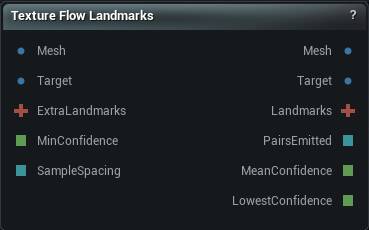
The Texture Flow Landmarks node
When to use it
Matches two meshes by their albedo rather than their shape. Both get rasterised to matching views, dense optical flow finds the pairs, and every confident 2D match is lifted back onto both surfaces.
How to use it
- 1
Wire the mesh being wrapped into Mesh and the scan into Target
Both need albedo - vertex colours or an embedded base-colour texture.
- 2
Pick the view that shows the region you care about, then press Find Texture Correspondences
- 3
Read Pairs Emitted and Albedo Contrast
Zero pairs on a featureless albedo is the correct answer, not a failure.
- 4
Wire Landmarks into Non-Rigid Fit (or Elastic Conformer)
Chain a second node through Extra Landmarks for another view.
Pins
| Pin | Type | Description |
|---|---|---|
Mesh |
Mesh | The mesh being wrapped. It supplies the source end of every pair, and it needs colour on it: vertex colours or a base-colour texture. Passes straight through to the Mesh output. |
Target |
Mesh | The mesh being wrapped onto. It supplies the target end of every pair, and it needs colour too. Rigid Fit the two first: this can follow a feature that moved a few dozen pixels, not a mesh sitting somewhere else entirely. |
ExtraLandmarks |
Landmarks | Optional. Landmarks the detected pairs merge into, so you can stack a second view or keep a hand-placed set. Whatever is already there wins. For several views, Multi View Fusion beats chaining nodes. |
MinConfidence |
Number | Overrides the confidence floor. Leave it unwired to use the value in the details panel. |
SampleSpacing |
Whole Number | Overrides the sample spacing. Leave it unwired to use the value in the details panel. |
| Pin | Type | Description |
|---|---|---|
Mesh |
Mesh | The source mesh, untouched. This node never changes geometry. |
Target |
Mesh | The target mesh, untouched. |
Landmarks |
Landmarks | The pairs it found, plus anything wired into Extra Landmarks. Each pair is a point on the Mesh surface and the place on the Target surface where that colour turned up. Wire this into Non-Rigid Fit or Elastic Conformer. |
PairsEmitted |
Whole Number | How many pairs this node contributed to the Landmarks output after merging with Extra Landmarks. A pair that collides on source position with an inherited one is dropped, so this can read lower than what the matching found. Zero on a mesh with no colour variation is the right answer, not a failure. |
MeanConfidence |
Number | Average confidence across the pairs that came out. With Multi View Fusion on, this is already discounted for how squarely each view saw the surface. |
LowestConfidence |
Number | The weakest pair that survived. Branch a batch graph on this rather than the average: one wrong pair drags the fit, and a healthy average will not save you from it. |
Settings
| Setting | Type | Description |
|---|---|---|
View Preset |
Choice | Which side the two meshes are looked at from. One view only sees the surface facing it, so pick the side the region you care about is on. Chain nodes through Extra Landmarks for more angles, or turn on Multi View Fusion to sweep several in one run. With fusion on, this is the middle of the sweep. |
Multi View Fusion |
True/False | Sweep several views around the model instead of using one, then keep only what they agree on. A pair two views found independently beats a single view's more confident guess, and a region where two views disagree is thrown out rather than guessed at. Costs a full pass per view. The sweep goes around the up axis, so it needs a side-on middle view. Pick Top or Bottom and it refuses. |
Num Views |
Whole number | How many views on the sweep. 5 across 180 degrees gives you side, three-quarter, front, three-quarter, side, which is the usual wrap camera set. The views sit symmetrically about the middle with one on each end, so an even count skips the middle view itself. Use an odd count when the View Preset direction has to be one of the cameras. |
View Arc Degrees |
Number | How wide the sweep is, centred on View Preset. 360 spreads the views evenly all the way round instead. |
Min View Facing |
Number | Throw away a pair where the surface is turned away from the camera at either end. 1 means dead-on, 0 means edge-on. Matches found on a steeply angled surface land in the wrong place, and the confidence score will not warn you: squashed texture looks like sharper texture, so those matches score higher, not lower. On a curved test surface the pairs below 0.5 carried about nine times the error of the face-on ones. 0 turns the check off. |
Custom View Direction |
Vector | Which way the camera points when View Preset is Custom. This is the direction it looks, not where it sits. |
Resolution |
Whole number | How big the internal render is. A match can only be as precise as one pixel is wide on the model, so this is the main quality dial: a 30 cm head at 512 lands within roughly 0.6 mm. Doubling it quadruples the cost. |
Cull Backfaces |
True/False | Ignore triangles facing away from the camera. Right for a closed scan, and the reason the inside of a nostril does not draw over the nose. Turn it off for a single-sided patch whose triangles happen to face the wrong way; the giveaway is a run that reports no coverage at all. |
Albedo Source |
Choice | Where the colour is read from. The two meshes are handled separately, so a textured scan can be matched against a vertex-coloured template. |
UV Layer |
Whole number | Which UV layer the textures are read through. Layer 0 unless the asset was authored with its colour on a second channel. |
Sample Spacing |
Whole number | One candidate every this many pixels, taking the best one in each cell. This is how many pairs you get, not how good they are. Asking for more will not improve a single one of them. |
Min Confidence |
Number | Matches scoring below this are thrown away. The score asks two things: was there anything here to match, and did the match hold up. A flat cheek scores near zero however tidy the answer looks there, and that is the right answer. The MinConfidence pin overrides this when wired. |
Forward Backward Check |
True/False | Match again in the opposite direction and drop anything that does not come back to where it started. This is what catches a match that is confident and wrong: a feature hidden behind something else, or the left eye matched to the right. Costs a second pass. Leave it on. |
Max Reprojection Error |
Number | How far, in pixels, the return trip is allowed to miss where it set off from. |
Max Pair Distance Fraction |
Number | Drop a pair whose two ends are further apart than this fraction of the two meshes' size. This node exists to remove small sliding errors, so a pair claiming a quarter of a head of movement has matched the wrong feature. |
Max Landmarks |
Whole number | Ceiling on how many pairs come out; the most confident survive. Every pair is something the fit then has to obey exactly, so more is not better. |
Pyramid Levels |
Whole number | How many progressively coarser passes the matcher makes. This is what lets it follow a feature that moved further than the feature is wide. Set it to 1 and it can only track about a pixel of movement. |
Flow Smoothness |
Number | How much the matcher smooths its answer. Higher is tidier but starts inventing movement in areas with no texture; lower is noisier and stays closer to what the colour actually says. Tuned for this app's numbers, so textbook values quoted elsewhere are hundreds of times too big here. |
Illumination Robust Matching |
True/False | Strip out local brightness and local contrast before matching, so the two meshes are compared on texture rather than on how light or dark they are. A scan usually has shading baked into its texture and a clean template does not. That is not noise you can average out: no answer satisfies the matcher at all, and it drifts towards whichever nearby patch has the weakest texture. On a head with a directional bake, mean error against a known deformation was 113 pixels with this off and 0.44 pixels with it on. It costs nothing when both albedos already match: on the same head with identical colour on both sides it still improved the result. Leave it on. |
Learn more
| 3D wrap MetaHuman conform meshes | Read the walkthrough on meshmorpher.com | https://meshmorpher.com/blog/how-to-3d-wrap-metahuman-conform-meshes-in-unreal-engine-with-mesh-morpher-graph |
| Wrapper with MH and DAZ characters | Read the walkthrough on meshmorpher.com | https://meshmorpher.com/blog/mesh-morpher-wrapper-with-mh-and-daz-characters |
Available in Mesh Morpher Graph and Mesh Morpher Studio.