Studio and Graph › Wrapper
Rigid Fit
Aligns one mesh to another using nothing but a move, a turn and a scale. No vertex moves relative to any other, so the shape is exactly what it was - it is just somewhere else.
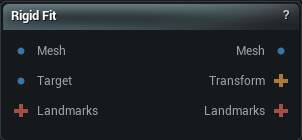
The Rigid Fit node
When to use it
Aligns one mesh to another using nothing but a move, a turn and a scale. No vertex moves relative to any other, so the shape is exactly what it was - it is just somewhere else.
This is the first step of every wrap. Non-Rigid Fit and Elastic Conformer both work by looking for the nearest bit of target surface, and that only means anything once the two meshes already sit on top of each other. Feed them two shapes standing in different places and the very first pass matches the wrong things.
The Transform output is the move it worked out. Send it through Apply Rigid Transform to put that same move on the clothing, the landmarks mesh, anything that has to travel with the body. Solving each part separately is what makes the parts drift apart.
How to use it
- 1
Connect the mesh to move and the target to align it to
- 2
Decide whether rotation and scale are allowed
- 3
Click Apply
Pins
| Pin | Type | Description |
|---|---|---|
Mesh |
Mesh | The mesh being moved. |
Target |
Mesh | The mesh being aligned to. It stays where it is. |
Landmarks |
Landmarks | Optional. Landmarks wired in here ride along with the move so they still sit on the surface afterwards. They do not steer the alignment itself. |
| Pin | Type | Description |
|---|---|---|
Mesh |
Mesh | The moved mesh. |
Transform |
Transform | The move it worked out. Send it to Apply Rigid Transform to put the same move on other meshes. |
Landmarks |
Landmarks | The landmarks you wired in, shifted onto the moved mesh. |
Settings
| Setting | Type | Description |
|---|---|---|
Use Rotation |
True/False | Let the fit turn the mesh as well as move and scale it. Off leaves the orientation exactly as you had it. |
Preserve Up Axis |
True/False | Keep the mesh upright and let it only spin around the vertical. Turn this off and the fit is free to pick any orientation, which on a roughly symmetric body means it can come back lying on its side or upside down. |
Use Scale |
True/False | Resize the mesh so it matches the target's size. |
Non-Uniform Scale |
True/False | Allow a different amount of scale on each axis, matching the target's bounding box rather than its overall size. Useful for a body that is the right height but the wrong width. Leave it on by accident and it will squash a head to fit. |
Align Floor Level |
True/False | After aligning, slide the result up or down so its lowest point sits at the target's lowest point. For anything that stands on a floor, matching the feet beats matching the middle. |
Learn more
| 3D wrap MetaHuman conform meshes | Read the walkthrough on meshmorpher.com | https://meshmorpher.com/blog/how-to-3d-wrap-metahuman-conform-meshes-in-unreal-engine-with-mesh-morpher-graph |
| Wrapper with MH and DAZ characters | Read the walkthrough on meshmorpher.com | https://meshmorpher.com/blog/mesh-morpher-wrapper-with-mh-and-daz-characters |
Available in Mesh Morpher Graph and Mesh Morpher Studio.