Studio and Graph › Wrapper
Non-Rigid Fit
Performs non-rigid mesh fitting using icp and ARAP.
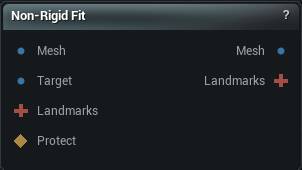
The Non-Rigid Fit node
Performs non-rigid mesh fitting using icp and a stiff-to-soft wrap.
Deforms a source mesh to match a target mesh using landmark correspondences and iterative closest point algorithms.
How to use it
- 1
Connect source mesh, target mesh, and landmarks
- 2
Configure fitting parameters
- 3
Click Apply to deform source to match target
Pins
| Pin | Type | Description |
|---|---|---|
Mesh |
Mesh | The mesh that gets bent. Its vertex count and layout survive. |
Target |
Mesh | The shape to match. It does not move. |
Landmarks |
Landmarks | Optional. Point and curve pairs pinning parts of the source to known places on the target. This is what keeps an eye corner on the eye corner instead of near it. |
Protect |
Weight Map | Optional. Paint the parts that should stay free - a mouth bag, an eye socket, anything with no match on the target. Painted areas are not pulled onto the target; they keep their shape and ride along with the surface around them. Unpainted areas fit normally. |
| Pin | Type | Description |
|---|---|---|
Mesh |
Mesh | The fitted mesh, same vertex count and layout as it went in. |
Landmarks |
Landmarks | The landmarks you wired in, moved onto the fitted mesh. |
Diagnostic Weights |
Weight Map | Selected diagnostic scaled to its threshold. Read the diagnostic summary for missing or unevaluated correspondence. |
Settings
| Setting | Type | Description |
|---|---|---|
Stiffness Steps |
Whole number | How many stages the fit works through on its way from stiff to floppy. The mesh is allowed to settle at each one before the next. Too few and it lurches between stages, picking up creases it never irons back out. |
Landmark Strength |
Whole number | How hard the landmarks pull compared to the general surface matching. Too low and a landmark drifts off the feature you put it on. Too high and the surface puckers into a dimple around each one. |
Decay Landmark Strength |
True/False | Fade the landmark pull out as the fit progresses, so they steer the early rough alignment and then hand over to the surface matching. |
Point-to-Plane Weight |
Number | How much a vertex may slide along the target surface instead of being pulled straight at its match. Sliding closes gaps faster across broad flat areas. 0 pulls every vertex straight at the nearest point. |
| Setting | Type | Description |
|---|---|---|
Starting Stiffness |
Number | How rigid the mesh is at the start. High values keep it moving as one piece while it finds the target's overall shape. |
Ending Stiffness |
Number | How loose the mesh is by the last stage. Lower lets it press into fine detail, and past a point it starts following the target's lumps and noise as well. |
Decay Power |
Number | The shape of the curve between the starting and ending stiffness. 1 is a steady run. Higher goes soft early and spends most of the fit loose. |
| Setting | Type | Description |
|---|---|---|
Max Search Distance |
Number | How far a vertex will look for its match on the target. Too small and whole patches find nothing and sit unmoved. Too large and a vertex grabs across a gap onto the wrong side of a fold, so lips get pulled into teeth. |
Use Bi-Directional |
True/False | Check every match from both meshes before trusting it. This is what stops the inside of a mouth latching onto the lips sitting in front of it. |
Use Normal Compatibility |
True/False | Only match surfaces that face roughly the same way. Without it the underside of a chin will happily grab the chest below it. |
Normal Angle Threshold |
Number | How far apart two surfaces can face and still be matched. Matches fade out as they approach this angle and are dropped past it. 55 is the crease-safe default; raise it only when facing surfaces really should match. |
Boundary Aware |
True/False | Trust matches less around open edges, where the surface simply stops and the nearest point on the target usually means nothing. |
Boundary Weight |
Number | How much pull the vertices along an open edge keep. 0 leaves the border to follow its neighbours instead of chasing the target, 1 treats it like any other vertex. |
Use Spatial Coherence |
True/False | Even out how much each vertex trusts its match by looking at the vertices around it. Stops one vertex being yanked at while the surface next to it stays put, which is where puckers come from. |
Coherence Blend |
Number | How much say a vertex's neighbours get in how far it trusts its own match. 0 leaves every vertex to itself. 1 hands the decision entirely to the neighbourhood. |
Max Correspondence Pull |
Number | How far a vertex's match may pull it in one solver pass, measured in average rest-edge lengths. 0 leaves the pull unclamped. A crease jump is a short residual the robust kernel trusts; this still caps how far a long wrong pull can move the mesh in one step. |
Prevent Self-Intersections |
True/False | Stop the mesh from passing through itself while it fits. Parts that meet slide along each other instead of stopping, so the fit still reaches the target; anything that does cross is pushed back until it just touches. Crossings already present in the source mesh are left as they are. |
Self-Intersection Clearance |
Number | Extra gap held between two parts of the mesh when they meet, in average edge lengths. Leave at 0 to only block crossings without adding any gap. Raise it slightly if surfaces that land exactly on each other cause shading artifacts. Capped at 0.2: every guard distance (stand-off, release, band) scales with this, so a large gap inflates thin features to the gap thickness and holds surfaces visibly apart. |
Self-Intersection Neighbor Rings |
Whole number | How many rings of connected neighbors around each point are ignored by the self-intersection check. Raise this if a tight crease is wrongly held back; keep it at 1 on thin parts like lips so real contacts are still caught. |
Self-Intersection Slide Along Contact |
True/False | Keep a held point moving. When a point is stopped by another part of the mesh, aim its match along that surface instead of straight through it, so the area keeps sliding toward the target instead of freezing where it touched. Turn off to only block crossings. |
Self-Intersection Heal Crossings |
True/False | Remember which side of a contact each point belongs on and push a point found on the wrong side back out over the following iterations. Turn off to only stop new crossings and leave anything that already slipped through where it is. |
| Setting | Type | Description |
|---|---|---|
Use Geodesic Correspondence |
True/False | Measure distance by walking across the surface rather than straight through the air, so two points that nearly touch across a gap are still understood to be far apart. Earns its keep around ears, nostrils, fingers and folds. Does nothing unless you have landmarks wired in. |
Landmark Mismatch Weight |
Number | How hard to cut a match that disagrees with your landmarks. 0 leaves every match as the surface search found it. 1 fully trusts the landmark test, so a nose cannot keep a grip on an ear. Halfway is the usual setting. A match that agrees with the landmarks is never reduced. |
Use Signature Filtering |
True/False | Throw out matches where the two points sit differently relative to your landmarks. This is what stops a nose matching an ear, or a left hand matching a right. |
Signature Similarity Threshold |
Number | How alike two points have to look before a match survives. Raising it throws out more. Push it too high and it starts discarding perfectly good matches, leaving patches of surface that never move. |
| Setting | Type | Description |
|---|---|---|
Smoothing Strength |
Number | How much the mesh is relaxed between solver passes. Enough of it irons out the ripples a hard pull leaves behind. Too much and the fit never gets close enough to pick up the target's detail. |
Smoothing Passes |
Whole number | How many relaxing passes to run between solver passes. |
Adaptive Smoothing |
True/False | Relax harder on the passes where the mesh travels a long way, and ease off once it has settled down. |
Smooth Landmark Vertices |
True/False | Let the relaxing passes touch the vertices your landmarks sit on. Turn it off when landmarks keep getting smoothed away from their marks. |
Smooth Boundary Vertices |
True/False | Let the relaxing passes touch open edges. Turn it off to stop a border creeping inwards a little more on every pass. |
| Setting | Type | Description |
|---|---|---|
Use Multi-Resolution |
True/False | Fit a coarse copy of the mesh first and work up to the real one. The big travel happens on the cheap copy, so the last pass has only detail left. |
Multi-Res Mode |
Choice | How the coarser and finer copies get built. |
Multi-Res Levels |
Whole number | How many extra copies to build. More of them survives a bigger difference between the two shapes, and costs you the time. |
Simplification Ratio |
Number | How much of the mesh survives at each coarser copy. 0.5 halves it each time. |
Subdivision Levels |
Whole number | How many copies denser than your own mesh to build. Only worth it when your mesh is too coarse to reach the detail on the target. |
Split Stiffness Per Level |
True/False | Give each copy its own slice of the stiffness range, so the coarse ones stay rigid and only the finest is allowed to go soft. |
| Setting | Type | Description |
|---|---|---|
Min Iterations Per Step |
Whole number | How many passes each stiffness stage runs before the fit is even allowed to call it settled. |
Convergence Threshold |
Number | How little the mesh has to move, measured against its own size, before a stage counts as settled and the fit moves on. Raise it to cut the fit short. |
Stall Patience |
Whole number | How many iterations the solver keeps trying after progress flattens out before it moves on to the next step. Lower ends steps sooner; higher gives a slow fit more room to keep creeping forward. |
Stall Threshold (%) |
Number | How much the fit error has to drop over that stretch to count as still making progress, as a percent of the current error. Below this the step is considered finished. 0 only stops once the error truly stops falling. |
Max Iterations Per Step |
Whole number | A hard ceiling on passes per stage, so a fit that will never settle still finishes rather than grinding all afternoon. |
| Setting | Type | Description |
|---|---|---|
Use GPU Acceleration |
True/False | Work out the matches on the graphics card. Much quicker on dense meshes, and it drops back to the processor on its own when the card cannot help. |
Use GPU Iterative Solver |
True/False | Solve the deformation on the graphics card as well, by closing in on the answer rather than computing it outright. Pays off on heavy meshes. |
GPU Solver Max Iterations |
Whole number | How many passes that solve gets before it hands back whatever it has reached. Raise it if the fit looks like it stopped short. |
GPU Solver Tolerance |
Number | How close that solve has to get before it calls it done. Below about 0.0001 the graphics card's solver cannot get any closer on a stiff mesh, so going lower just spends extra passes for no sharper result. The processor's exact solve ignores this. |
| Setting | Type | Description |
|---|---|---|
Visualization Mode |
Choice | What gets painted on the mesh in the diagnostic window that opens beside the app while the fit runs. It is a tuning aid for watching the solver work, not a preview. Disabled opens no window and is the quickest. |
Preview Update Interval |
Whole number | How many solver passes go by between redraws of that window. Higher redraws less often and steals less time from the fit. |
Max Displacement Scale |
Number | The distance that reads as full colour in that window. 0 picks a scale from the size of the mesh. Affects the colours only, never the fit. |
Diagnostic View |
Choice | Which diagnostic paints Diagnostic Weights. |
Residual Threshold |
Number | Residual above this counts as an issue. Same units as the mesh. |
Strain Threshold |
Number | Log-strain above this counts as an issue. Default is about 25 percent stretch. |
Low Color |
Colour | Color at weight 0 (no issue / zero residual). |
High Color |
Colour | Color at weight 1 (at or above the threshold, or a binary issue). |
Diagnostic Summary |
Text | Counts of issues on the last accepted wrap. |
Learn more
| 3D wrap MetaHuman conform meshes | Read the walkthrough on meshmorpher.com | https://meshmorpher.com/blog/how-to-3d-wrap-metahuman-conform-meshes-in-unreal-engine-with-mesh-morpher-graph |
| Wrapper with MH and DAZ characters | Read the walkthrough on meshmorpher.com | https://meshmorpher.com/blog/mesh-morpher-wrapper-with-mh-and-daz-characters |
Available in Mesh Morpher Graph and Mesh Morpher Studio.