Studio and Graph › Wrapper
Apply Rigid Transform
Applies a rigid transform that Rigid Fit Mesh already solved.
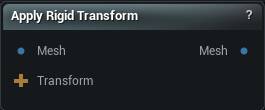
The Apply Rigid Transform node
When to use it
Applies a rigid transform that Rigid Fit Mesh already solved.
The point is reuse. Solve the alignment once against the geometry you trust, then move everything else with that same motion: the body, its clothing, the mesh its landmarks were placed on. Solving separately for each part is what makes the parts drift apart.
Points move and nothing else does. Vertex count, order, weights and attributes come through untouched.
How to use it
- 1
Connect the mesh and the rigid transform
- 2
The output is that mesh, moved
Pins
| Pin | Type | Description |
|---|---|---|
Mesh |
Mesh | The mesh to move. |
Transform |
Transform | The move, rotation and scale to apply. Comes straight off a Rigid Fit node's Transform pin. |
| Pin | Type | Description |
|---|---|---|
Mesh |
Mesh | The mesh with that move baked into its vertex positions. |
Learn more
| 3D wrap MetaHuman conform meshes | Read the walkthrough on meshmorpher.com | https://meshmorpher.com/blog/how-to-3d-wrap-metahuman-conform-meshes-in-unreal-engine-with-mesh-morpher-graph |
| Wrapper with MH and DAZ characters | Read the walkthrough on meshmorpher.com | https://meshmorpher.com/blog/mesh-morpher-wrapper-with-mh-and-daz-characters |
Available in Mesh Morpher Graph and Mesh Morpher Studio.