Studio and Graph › Morph Targets
Load Morph Target
Applies one of the morph targets the incoming mesh already carries, at whatever Weight you dial in. No asset needed: the dropdown lists what is on the wire, and the deltas are already in that mesh'...
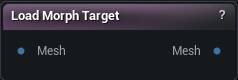
The Load Morph Target node
When to use it
Applies one of the morph targets the incoming mesh already carries, at whatever Weight you dial in. No asset needed: the dropdown lists what is on the wire, and the deltas are already in that mesh's own space.
In the editor, when the mesh came from Load Skeletal Mesh, the asset's own morph targets show up too, posed onto the current skeleton. Names carried on the wire always win, which is what keeps a graph behaving identically in the packaged app.
An empty dropdown means nothing upstream put a morph target on the mesh. Add a Create Morph Target, or import through a path that carries them.
How to use it
- 1
Connect a mesh that carries morph targets
- 2
Pick a morph target name from the dropdown
- 3
The output is the morphed mesh
Pins
| Pin | Type | Description |
|---|---|---|
Mesh |
Mesh | A mesh that already carries morph targets. Wire List Morph Targets in first if you are not sure it does. |
| Pin | Type | Description |
|---|---|---|
Mesh |
Mesh | The mesh with the chosen shape dialled in. It still carries the whole set, so you can chain a second one after it. |
Settings
| Setting | Type | Description |
|---|---|---|
Morph Target Name |
Text | Which shape to apply. The list is whatever the connected mesh is carrying. |
Weight |
Number | How much of the shape to apply. 1 is full, 0 is none. Push past 1 to exaggerate the pose, or go negative to run it backwards. |
Use Dual Quaternion Skinning |
True/False | Pose the asset's deltas with dual quaternion skinning instead of linear blend. Only matters for shapes read off a Skeletal Mesh asset; ones carried on the mesh are already in the right space and need no posing. |
Learn more
| Organize and categorize morph targets | Read the walkthrough on meshmorpher.com | https://meshmorpher.com/blog/organize-and-categorize-morph-targets-with-mesh-morpher-classic |
| Generate DNA bone expressions from morph targets | Read the walkthrough on meshmorpher.com | https://meshmorpher.com/blog/automatically-generate-mh-dna-bone-driven-expressions-from-morph-targets |
Available in Mesh Morpher Graph and Mesh Morpher Studio.